

OneSignal
Updated
Rich push, segments and in-app messages through your OneSignal account.
- JavaScript:
window.AppSorcerer.onesignal - Plan: Essential — included in every plan
- Platforms: Android apps today. iOS support arrives with iOS builds (coming soon).
- Android permissions:
POST_NOTIFICATIONS
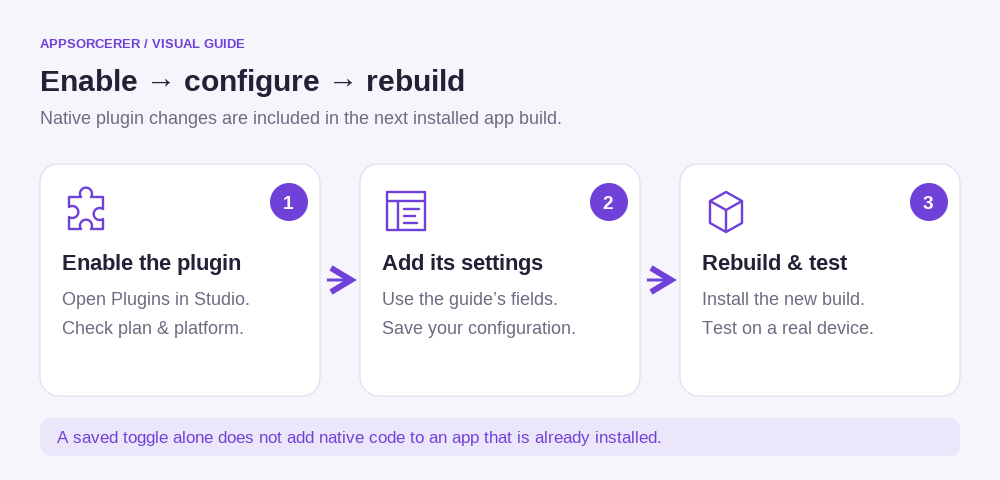
Turn the plugin on in App Studio → Plugins, fill in its settings, then rebuild your app. Websites call it through the JavaScript bridge.
Settings
| Studio label | Type | Default | Notes |
|---|---|---|---|
| OneSignal App ID | text | – | required |
| Ask for permission on first launch | toggle | true | |
| In-app messages | toggle | true |
Setup
- Create an app in OneSignal and set up Google Android (FCM) there. OneSignal manages the Firebase sender, so this plugin doesn't need a
google-services.jsonfile. - Paste the OneSignal App ID in the plugin settings. If you leave it empty, the App ID from Push Notifications is used.
- When OneSignal is your provider in Push Notifications, the standard
AppSorcerer.push.*calls use this plugin too. The push token they return is the OneSignal subscription ID.
JavaScript API
Every method returns a Promise. Call it as await AppSorcerer.onesignal.<method>(args).
| Method | Arguments | Resolves with |
|---|---|---|
requestPermission | { fallbackToSettings?: boolean } | { granted, token, subscriptionId } |
getPermission | – | { granted, canRequest } |
login | { externalId, jwt? } | null — links the device to your user ID (OneSignal external ID) |
logout | – | null |
getIds (alias getSubscription) | – | { token, subscriptionId, pushToken, optedIn, onesignalId, externalId, permission } |
optIn / optOut | – | null |
addTags | { tags: { key: value } } (a null value removes that tag) | null |
addTag / removeTag | { key, value } / { key } | null |
removeTags | { keys: string[] } | null |
getTags | – | { key: value } |
addEmail / removeEmail | { email } | null |
addSms / removeSms | { number } (E.164) | null |
setLanguage | { language } (ISO 639-1) | null |
addAlias / removeAlias | { label, id } / { label } | null |
trackEvent | { name, properties? } | null (OneSignal custom events) |
setInAppMessagesEnabled | { enabled } | { enabled } |
clearAllNotifications | – | null |
setConsentGiven | { given } | null |
Calls forwarded from the core push.* namespace are also accepted: register (= requestPermission), getToken (= getIds), setExternalId({ id }) (login, or logout when id is null) and setTags({ tags }).
Events
Listen with AppSorcerer.on('<event>', callback) (or the DOM event appsorcerer:<event>).
| Event | Data |
|---|---|
push.opened | { source: "onesignal", notificationId, title, body, url, actionId, additionalData } — emitted after the notification's URL (launch URL, or additionalData.url / targetUrl) has loaded in the WebView |
push.received | same fields — a notification arrived while the app was open (it is still displayed) |
onesignal.permissionChanged | { granted } |
onesignal.subscriptionChanged | { subscriptionId, token, optedIn } |
Errors
Rejections carry error.code: not_configured, invalid_args, unknown_method.
Example
JavaScript
// After your website signs the customer in:
await AppSorcerer.onesignal.login({ externalId: customer.id });
await AppSorcerer.onesignal.addTags({ tags: { vip: 'true', city: 'Berlin' } });

const { granted } = await AppSorcerer.onesignal.requestPermission();

AppSorcerer.on('push.opened', (n) => {
  console.log('Opened notification', n.notificationId, n.additionalData);
});
Notes
- Notification links open inside the app, never in the browser. Relative links open from your start page.
- "Ask for permission on first launch" asks once per install, as long as Android still allows the prompt.
Was this helpful?