What Is Deep Linking in a Mobile App? A Plain Guide
Deep linking explained without jargon: custom URL schemes, Android App Links, Universal Links and deferred deep links, how Android verifies assetlinks.json, and where deep links pay off for an online store.
On this page
- What is deep linking in a mobile app?
- What's the difference between deep links, App Links and deferred deep links?
- How does Android verify an App Link?
- Where do deep links pay off for an online store?
- How do you set up deep links in an AppSorcerer app?
- Frequently asked questions
- Is a deep link just a normal URL?
- Do deep links work if the app isn't installed?
- Do I need Branch or AppsFlyer for deep linking?
- Why does my link open the browser instead of the app?
Deep linking in a mobile app is what makes a link behave like a link. Without it, a shopper taps "Shop the sale" in your email, the app opens on its home screen, and they have to find the sale themselves. Most give up. With it, the same tap lands them on the sale page inside the app, already signed in, one step from the cart.
Short answer: Deep linking in a mobile app means a link opens one specific screen inside the app, such as a product or an order, instead of the home screen. Android supports custom schemes like myshop://, plain web links and verified App Links, and iPhone uses Universal Links. Deferred deep links go further: they remember the destination while someone installs the app first.
The terms get mixed up constantly, partly because vendors use them loosely. Here's what each one actually does, how Android decides whether your app may open a link, and what it takes to set this up for a store.
What is deep linking in a mobile app?
A deep link is any link that points past an app's front door. On the web every URL is already a deep link: /products/blue-mug goes straight to the mug. Apps had to add this on purpose. Each app declares which links it can handle, and the phone's operating system routes a tapped link to it.
Android does this through intent filters, a list in the app's manifest of the schemes, domains and paths it accepts (Android Developers). When you tap a matching link, Android opens the app the user picked as default, or the only app that can handle it, or shows a chooser so the user can pick. That chooser is the reason "it works on my phone" isn't proof of anything.
What's the difference between deep links, App Links and deferred deep links?
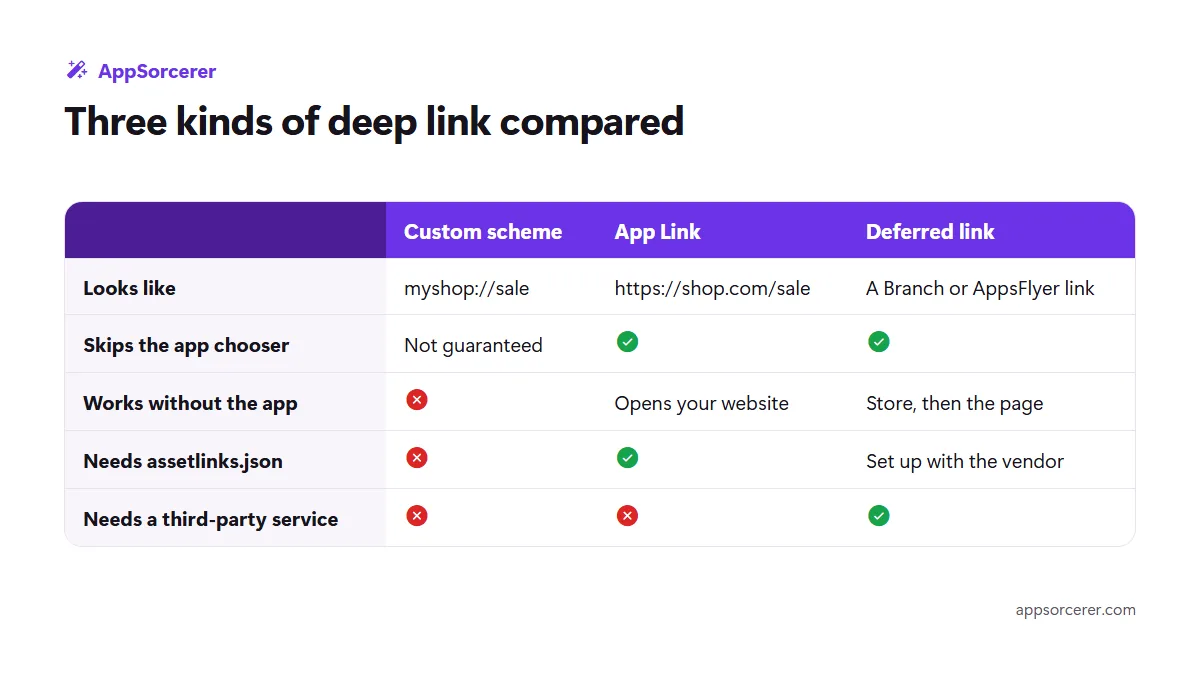
There are four kinds you'll hear about. They differ in what the link looks like and what happens when the app isn't there.
| Link type | Example | App installed | App not installed |
|---|---|---|---|
| Custom URL scheme | myshop://products/123 | Opens the app, unless another app claims the same scheme | Fails; there's no website to fall back to |
| Unverified web link | https://shop.com/products/123 | On Android 12 and later, usually opens the browser | Opens your website |
| Android App Link or iOS Universal Link | https://shop.com/products/123 | Opens the app directly, with no chooser | Opens your website |
| Deferred deep link | A Branch or AppsFlyer link | Opens the app at the right page | Sends people to the store, then to the page after install |
A few details matter more than they look:
- Custom schemes aren't owned by anyone. Android warns that another app can register the same scheme and trigger the chooser. Apple goes further: if two apps register one scheme, which app opens is undefined, and it strongly recommends Universal Links instead (Apple Developer).
- Plain web links lost their power on Android 12. Since Android 12, a web link only goes to your app if the app is approved for that domain. Otherwise it opens in the default browser.
- App Links need Android 6 or later and Google services on the device (Android Developers).
- Deferred deep links need a third-party service. Google's free option, Firebase Dynamic Links, was shut down on 25 August 2025 (Firebase). Today that work is done by attribution vendors such as Branch, AppsFlyer or Adjust.
How does Android verify an App Link?
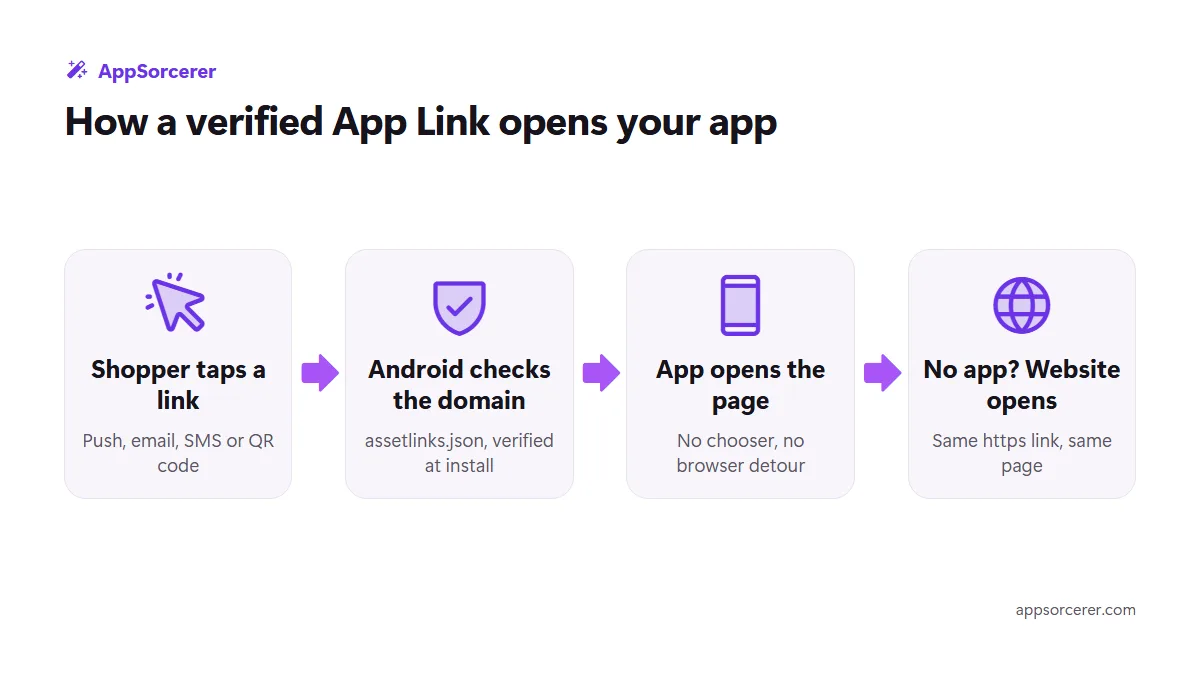
Verification is a handshake between your app and your website. The app says "I handle links for shop.com", and shop.com says "yes, that app may". If both sides agree, Android skips the chooser for good.
Your side of the handshake is a small JSON file called assetlinks.json, hosted at https://shop.com/.well-known/assetlinks.json. It names your app's package and the SHA-256 fingerprint of the certificate that signs it (Android Developers):
[{
  "relation": ["delegate_permission/common.handle_all_urls"],
  "target": {
    "namespace": "android_app",
    "package_name": "com.example.shop",
    "sha256_cert_fingerprints": ["AB:CD:…:EF"]
  }
}]
When verification fails, check these three things first:
- The wrong fingerprint. If Google Play signs your app (Play App Signing, the default for new apps), the fingerprint from your own upload key won't match what customers install. Copy the app signing key's SHA-256 from Play Console under Protected with Play, then Play Store protection, then Manage Play app signing (Play Console Help).
- A missing host. shop.com and www.shop.com are two hosts, and each needs the file.
- Redirects or bot checks in front of the file. Serve it over HTTPS as plain JSON, with no login or firewall challenge.
Android checks the file when the app is installed. To see its verdict on a test phone, run adb shell pm get-app-links com.example.shop and look for verified next to each domain. On Android 12 and later you can force a fresh check with pm verify-app-links --re-verify (Android Developers).
The same file got more useful with Android 15. It can now carry dynamic rules that match paths, query parameters and fragments, and phones on Android 15 or later with Google services fetch it again from time to time. In practice, that means you can stop a URL such as /checkout from opening the app without shipping a new version. Older phones keep using the rules built into the app.
Where do deep links pay off for an online store?
Anywhere you already send people a link. The difference is that the link now lands inside the app, where they're signed in and their cart is waiting.
- Push notifications. A price-drop push should open that product, not the home screen. It is the easiest win of the lot.
- Email and SMS campaigns. Campaign links can land on the collection being promoted.
- QR codes on packaging, receipts and shop counters. A custom scheme or App Link opens the reorder page.
- Referral and influencer links. These need deferred deep links, because the person tapping usually doesn't have the app yet.
- Customer service. Support replies can link straight to an order or the returns page.
One caution if you sell on Shopify: with AppSorcerer, Shopify product and collection links opening the app is coming soon. Until then, those links open the browser, so test every campaign link before you send it.
How do you set up deep links in an AppSorcerer app?
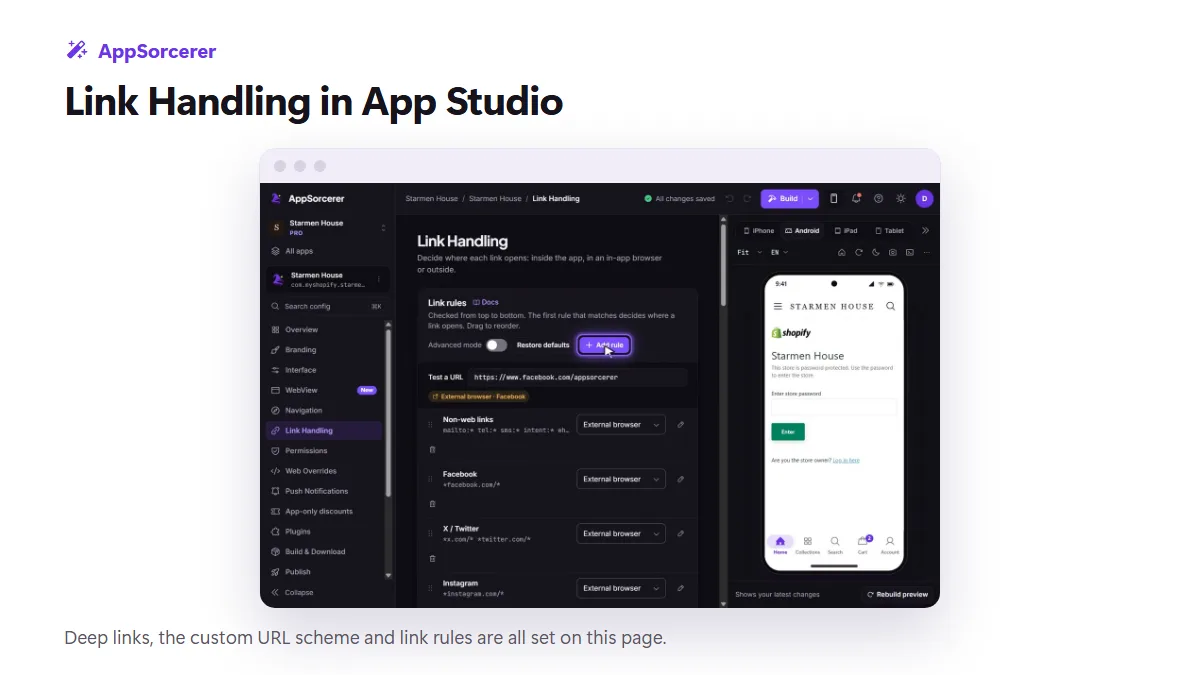
Deep links and a custom URL scheme are both live in App Studio, under Link Handling. The deep links guide walks through adding your domains, hosting assetlinks.json and pasting the Google Play signing fingerprint, then rebuilding so the new link handling reaches phones. Link rules sit on the same screen and decide whether other links open in the app, an in-app browser or outside (link rules guide).
For referral links and install attribution, the Branch.io plugin adds deferred deep links. It's a premium plugin, so it's available on plans that include premium plugins: Growth includes up to five, and Pro includes every plugin.
Test on a real store build, not a test build signed with a temporary key, because verification checks the signature. Tap a link from the apps your customers actually use, such as Gmail, WhatsApp and Instagram. If something fails, fix the file, then uninstall and reinstall, since Android only checks again on install or update.
Frequently asked questions
Is a deep link just a normal URL?
It can be. App Links and Universal Links are ordinary https addresses that open your app when it's installed and your website when it isn't. Custom scheme links like myshop:// only make sense to a phone with your app on it.
Do deep links work if the app isn't installed?
Verified web links fall back to your website, which is usually fine. Custom scheme links simply fail. If you need people to install the app and then land on the right page, you need a deferred deep linking service such as Branch.
Do I need Branch or AppsFlyer for deep linking?
Not for ordinary deep links: App Links and a custom scheme work without them. You need a vendor for deferred deep links and for attribution, meaning knowing which campaign or referrer brought each install.
Why does my link open the browser instead of the app?
On Android 12 and later, the usual cause is failed verification: a wrong fingerprint, a missing www host or a redirect in front of assetlinks.json. Run the adb check above, fix the file and reinstall the app.
Want to try this on your own site? Start free and set up deep links in App Studio, or see which plans include premium plugins on the pricing page.