How to Convert a WordPress Website to an Android App
Four ways to turn a WordPress site into an Android app: PWA plugins, WordPress plugin builders, WebView builders and custom REST API apps, with November 2026 prices plus WooCommerce and Google Play tips.
On this page
- What are the ways to convert a WordPress website to an Android app?
- Is a PWA plugin enough?
- Plugin builders or a URL-based builder?
- How do you turn your WordPress site into an Android app with AppSorcerer?
- What about WooCommerce, logins and push?
- What does Google Play need from a WordPress app?
- Frequently asked questions
- Can I convert a WordPress website to an Android app for free?
- Do I need to install a plugin on my WordPress site?
- Will the app update when I publish a new post?
- Can I get an iPhone app from my WordPress site too?
You can convert a WordPress website to an Android app in an afternoon, but the route you pick decides which of your plugins survive the trip. A typical WordPress site isn't just posts and pages. It has a page builder, a contact form, maybe WooCommerce, a membership plugin and a cookie banner. Some app builders show all of that. Others rebuild your content as native screens and leave the awkward parts behind.
Short answer: You have four routes: a PWA plugin (installable from Chrome, but no Play Store listing on its own), a WordPress plugin that builds the app from your dashboard, a WebView builder that wraps your live mobile site, or a custom app on the WordPress REST API. For most blogs, membership sites and WooCommerce stores, a WebView builder keeps every plugin working with the least effort.
This is the WordPress-specific companion to our general guide on turning any website into an Android app. That post walks through the whole build. This one covers what's different when the site runs on WordPress.
What are the ways to convert a WordPress website to an Android app?
Here's how the four routes compare at the time of writing (November 2026). Prices come from each vendor's own page.
| Route | Where the app's content comes from | Your other plugins | Google Play listing | Price example |
|---|---|---|---|---|
| PWA plugin | Your site, launched from the home screen | All keep working | Not on its own | Free plugins. |
| Plugin + WebView app (WPMobile.App) | Your mobile site inside an app shell | All keep working | Yes, on your own account | €129 one-time for Android, excluding VAT. |
| Plugin + native screens (AppMySite) | Posts, pages, menus and products synced by its plugin | Supported ones; test the rest | Yes | Free plan for one Android app; from US$5 a month without its branding. |
| URL-based WebView builder (AppSorcerer) | Your live mobile site, plus native tabs and push | All keep working | Yes, signed AAB on paid plans | Free test APK; store builds from Starter. |
| Custom app on the REST API | JSON from your site's API, drawn by your own code | Only what your developer rebuilds | Yes | Developer time. |
Sources: WPMobile.App on WordPress.org, AppMySite WordPress pricing and the AppMySite plugin page.
Is a PWA plugin enough?
For a blog that mainly wants a home-screen icon, maybe. A progressive web app needs a manifest, a service worker and HTTPS, and plugins add those for you. On Android, Chrome usually installs a PWA as a WebAPK, a real Android package built on a minting server, so it sits in the launcher like any other app (web.dev). What you don't get is a Google Play listing. For that you'd wrap the PWA in a Trusted Web Activity, which is a developer job.
One warning: the PWA feature plugin on WordPress.org currently shows a notice that it hasn't been tested with the last three major WordPress releases. Check the "Last updated" date of any PWA plugin before you build on it.
Plugin builders or a URL-based builder?
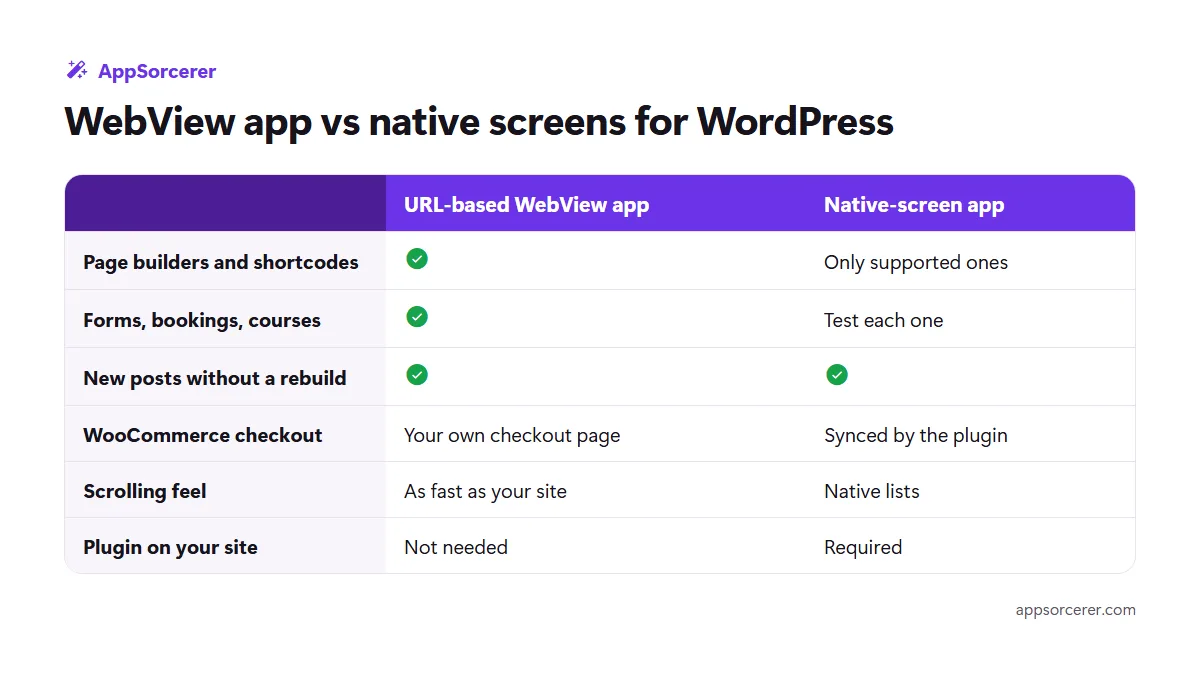
Plugin builders live inside wp-admin, which many site owners like. WPMobile.App shows your site in a WebView and sells a lifetime licence, so there's no monthly bill. AppMySite takes the other path: its plugin syncs posts, pages, menus and WooCommerce products into native screens, which scroll nicely for a content-heavy blog or catalogue. The catch with native screens is that the app only shows what the plugin knows how to translate. AppMySite says it supports popular plugins, custom fields and shortcodes, so open your most complicated pages in its preview before paying.
A URL-based builder such as AppSorcerer needs nothing installed on WordPress at all. It loads your real mobile site, so page-builder layouts, forms, course players and your checkout behave as they do in a phone browser. The trade-off is honest: the app is only as fast as your mobile site. We compared both approaches in WebView vs native app.
How do you turn your WordPress site into an Android app with AppSorcerer?
These steps assume your theme already works well on a phone. If the mobile site is slow or cluttered, fix that first, because the app inherits it.
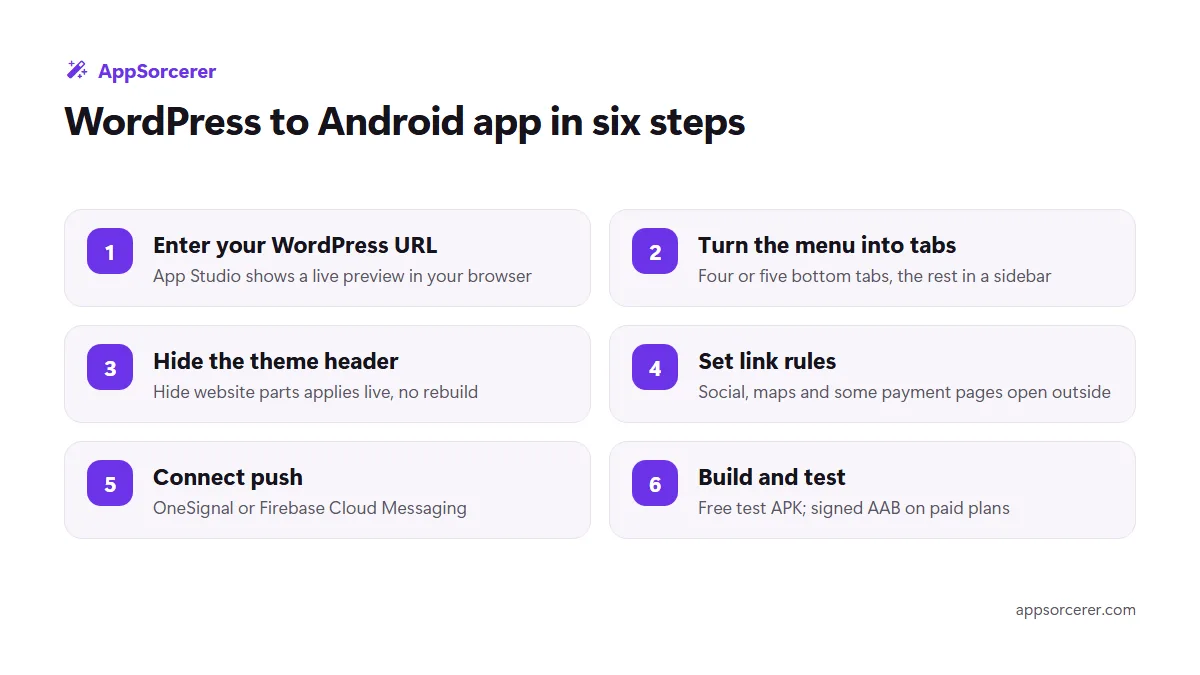
- Start from your address. Sign up, enter your WordPress URL and App Studio shows a live preview of the app in your browser.
- Turn your menu into tabs. WordPress menus are built for desktop. Pick four or five destinations for bottom tabs (Home, Blog or Shop, Search, Account) and move the long tail into a sidebar.
- Hide the theme's own chrome. Use Hide website parts to remove your theme's header, announcement bar and footer inside the app only. It applies live, without a rebuild (guide).
- Decide where links open. Keep your own pages in the app, and send social profiles, maps and some payment pages to the browser or another app with link rules.
- Connect push. Use OneSignal or Firebase Cloud Messaging. Campaigns and automations come with the Growth plan.
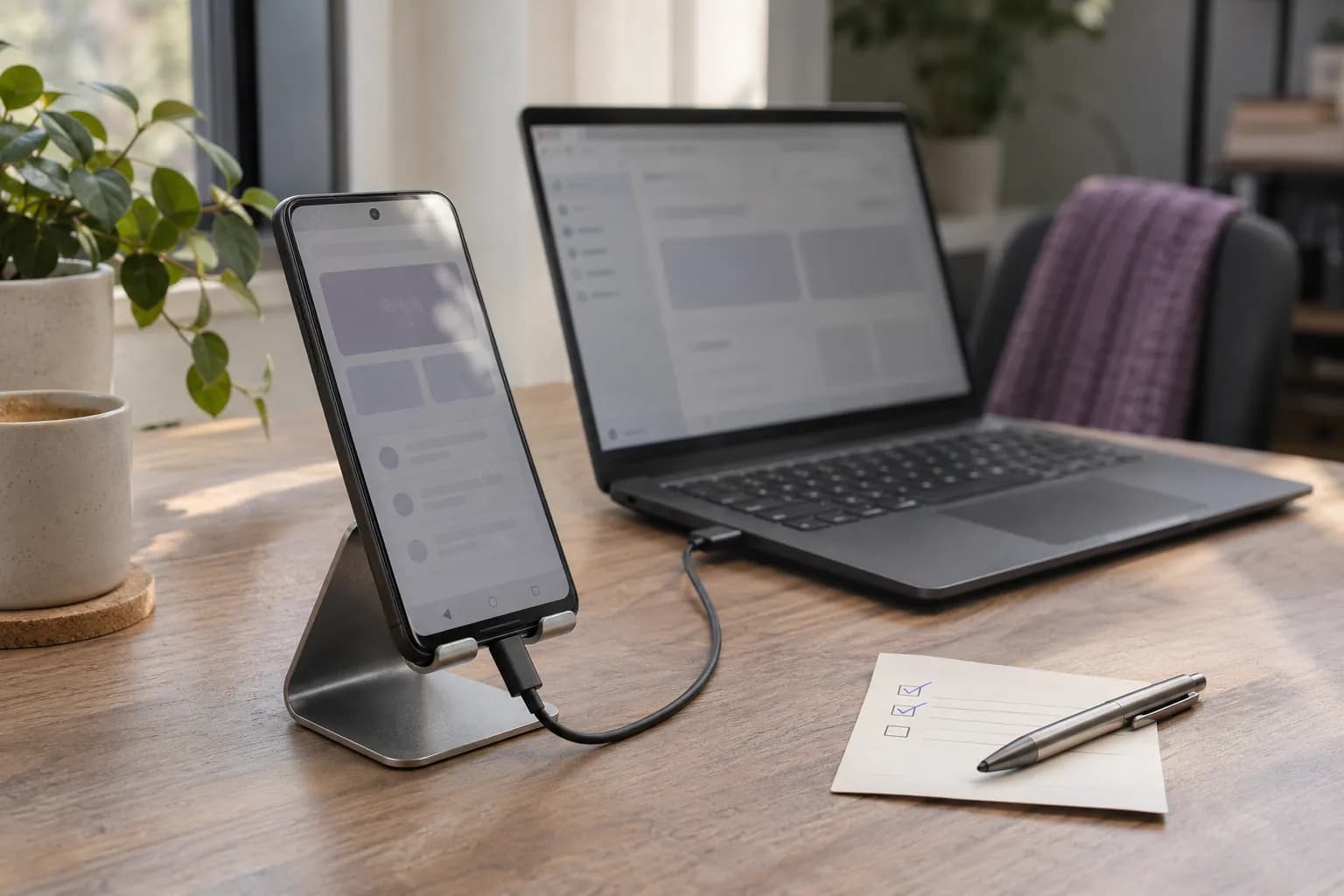
- Install a test build. The Free plan builds a test APK you can sideload on your own phone. A paid plan adds the signed Android App Bundle that Google Play wants, plus an APK.
What about WooCommerce, logins and push?
Start with a common mix-up. The WooCommerce mobile app and the Jetpack app are for you, the owner: adding products, handling orders, reading stats. Your customers can't shop with them. What you're building is a separate app with your brand on it.
In a WebView app, WooCommerce runs the same cart, checkout and My Account pages as your mobile site. That's the main reason we'd pick this route for a store: no product sync to break, no second checkout to maintain. Still, test every payment method in the test build. Card payments with 3-D Secure, PayPal and UPI-style flows sometimes hand off to another domain or another app, and that's where a link rule earns its keep.
Push is the feature your website can't match. Once OneSignal or FCM is connected, you can announce a new post, a sale or a restock. Don't ask for notification permission the moment the app opens; let people read something first.
What does Google Play need from a WordPress app?
The Play side doesn't care that your site runs on WordPress, but it has rules you can't skip:
- A developer account. Google charges a one-time US$25 registration fee (Play Console Help).
- Testing on new personal accounts. Accounts created after 13 November 2023 need a closed test with at least 12 testers opted in for 14 days in a row before production. Our 12 testers guide explains how to get through it.
- A current target API level. Since 31 August 2026, new apps and updates must target Android 16, API level 36 (Play Console Help). If a plugin builder generates your app, ask how it handles the yearly bump.
- More than a website in a frame. Native tabs, push and an offline page help a lot. See will Google Play accept a WebView app.
- A privacy policy URL. WordPress has a privacy page helper under Settings → Privacy, which gives you a starting draft.
Frequently asked questions
Can I convert a WordPress website to an Android app for free?
You can test one for free. AppSorcerer's Free plan builds an installable test APK with a watermark, and PWA plugins cost nothing. Publishing on Google Play needs a store build, which starts with the $6 Starter plan, and Google's own registration fee on top.
Do I need to install a plugin on my WordPress site?
Not with a URL-based builder like AppSorcerer, which works from your site's address. Plugin builders such as WPMobile.App and AppMySite do need their plugin, because that's how they read your menus or sync your content.
Will the app update when I publish a new post?
With a WebView app, yes. The app loads your live site, so new posts, prices and pages appear the next time a screen loads. You only rebuild after changing app-level settings such as the icon or plugins.
Can I get an iPhone app from my WordPress site too?
Not from AppSorcerer yet. iOS builds are coming soon, and you can already design and preview the iOS look in App Studio while your Android app goes live.
If you'd like to see your own WordPress site as an app before spending anything, create a free account and build a test APK, or compare the plans on our pricing page.