OneSignal vs Firebase Cloud Messaging: Which to Use?
OneSignal or Firebase Cloud Messaging for app push? How each works on Android, what OneSignal's new 1,000 MAU free limit means, current pricing, and when each one is the right choice.
On this page
- OneSignal vs Firebase at a glance
- What does Firebase Cloud Messaging do on its own?
- What does OneSignal add on top of FCM?
- How much do OneSignal and Firebase cost in November 2026?
- Which should you choose: OneSignal or Firebase?
- Can you use OneSignal or Firebase with AppSorcerer?
- Frequently asked questions
- Does OneSignal use Firebase?
- Is Firebase Cloud Messaging really free?
- Is OneSignal still free?
- Which is better for a Shopify store app?
If you're adding push notifications to an Android app, the choice usually comes down to OneSignal vs Firebase Cloud Messaging (FCM). They're often compared as rivals, but on Android one sits on top of the other: OneSignal hands its Android pushes to Google's FCM. The real question is whether you want only the delivery pipe, or the pipe plus a marketing dashboard, and whether that dashboard is worth paying for now that OneSignal's free plan has changed.
Short answer: Firebase Cloud Messaging is Google's no-cost delivery service. It gets a push to the phone, and anything smarter, such as automated journeys or behaviour-based triggers, is code you run on your own server. OneSignal sends Android pushes through your Firebase project and adds a dashboard, segments, journeys and A/B tests. Its Free plan now covers mobile push only up to 1,000 monthly active users.
OneSignal vs Firebase at a glance
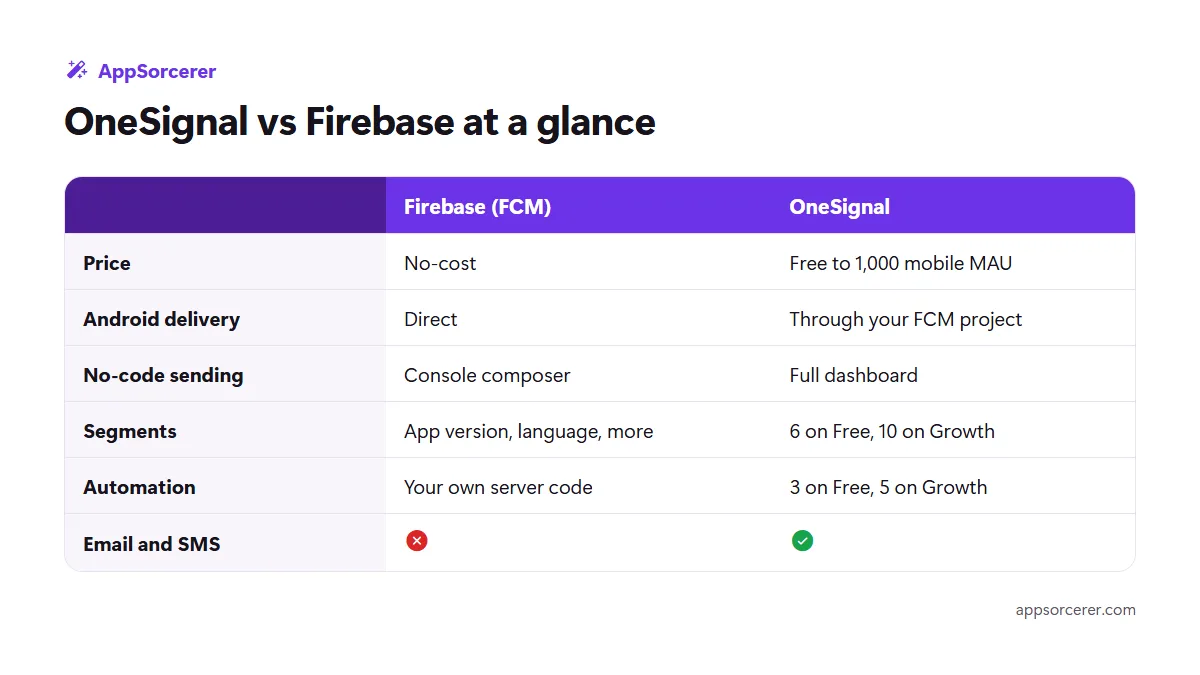
The table compares what each gives you out of the box, with OneSignal's plan details as listed on its pricing page at the time of writing (November 2026).
| Firebase Cloud Messaging | OneSignal | |
|---|---|---|
| What it is | Google's message delivery service | A messaging platform for push, in-app, email, SMS and web push |
| Android delivery | Direct | Through FCM, using a service account key from your Firebase project |
| Price | No-cost | Free plan up to 1,000 mobile monthly active users; Growth from $19 a month plus $0.012 per mobile MAU |
| Sending without code | Notifications composer in the Firebase console | Dashboard with message editor and scheduling |
| Audience targeting | Devices, device groups and topics by API; segments by app version, language or user properties in the console | Segments and data tags: 6 each on Free, 10 each on Growth |
| Automation | Your own server code | Journeys: 3 on Free, 5 on Growth |
| A/B tests | Analytics-based tests in the console | Up to 2 variants on Free and Growth, up to 10 on higher plans |
| Reports | Sends, received, impressions and opens (needs Google Analytics) | Clicks, CTR and influenced opens; history kept 30 days on Free, 90 on Growth |
What does Firebase Cloud Messaging do on its own?
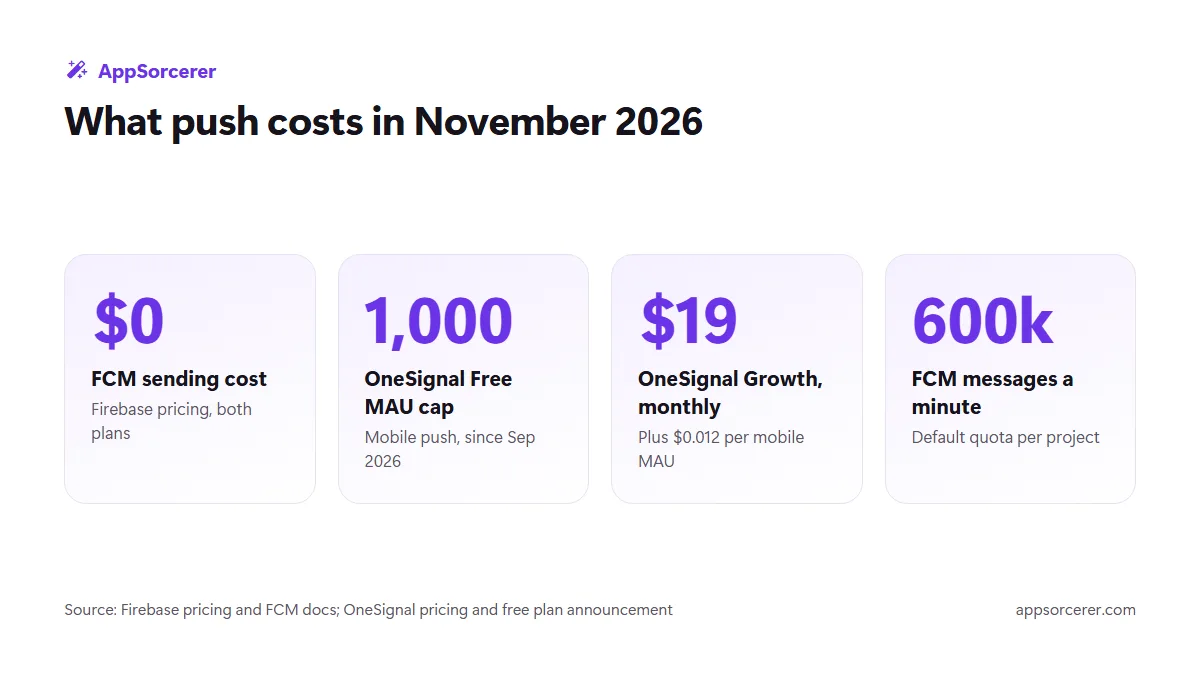
FCM is plumbing, and good plumbing. Google lists Cloud Messaging among the no-cost products on both the free Spark plan and the pay-as-you-go Blaze plan, as the Firebase pricing page shows. You're not billed per message or per user.
According to the FCM overview, you can send two kinds of message. Notification messages are shown by the system for you. Data messages carry custom key-value pairs that your app handles itself. Either type can carry up to 4,096 bytes, and you can address a single device, a group of devices or everyone subscribed to a topic.
For non-developers there's the Notifications composer in the Firebase console. Google describes it as handy for testing and for targeted marketing, though less flexible than sending through the Admin SDK or the HTTP v1 API. According to the console guide, it can target users by app version, language or user properties, schedule a message, cancel a scheduled one before it starts, and run A/B tests based on Analytics. Messages sent from the console are capped at 1,000 characters, a limit Google mentions on its message types page.
What FCM doesn't give you is logic. A cart reminder one hour after someone leaves, a restock alert when inventory changes, a weekly digest per segment: each one needs a server or Cloud Function that watches for the event and calls the API. Limits are generous. The default quota is 600,000 messages per minute per project, and a single Android device can receive up to 240 messages a minute, according to Google's throttling and quotas page.
What does OneSignal add on top of FCM?
OneSignal is a tool for the people who write and schedule messages. Its Android setup guide has you create a Firebase project anyway, generate a service account private key and upload it to OneSignal, so its servers can send through your Firebase project. Delivery on Android is still FCM's job.
On top of that you get:
- A dashboard where non-developers write, preview, schedule and target pushes.
- Segments and data tags for targeting, with the number allowed rising by plan.
- Journeys, OneSignal's visual automation builder, so flows like welcome series run without server code.
- Email, SMS, in-app messages and web push in the same account.
- Reporting with click-through rate and influenced opens, plus per-plan history.
That's a real productivity gain if a marketer, not a developer, runs your messaging. It's also a second system, with its own account, its own subscriber list and its own bill.
How much do OneSignal and Firebase cost in November 2026?
FCM costs nothing to send. Your only costs are whatever server or Cloud Functions you run to trigger messages, and the time to build that logic.
OneSignal changed its free tier this autumn. Its announcement explains that the Free plan now has a limit of 1,000 monthly active users per organisation for mobile push and in-app messages. It applied to new sign-ups from 1 September 2026 and to existing accounts from 1 October 2026. Go over it and you get 24 hours to upgrade before mobile push and in-app messages pause. Web push and email keep working within their existing limits.
Two details catch people out:
- The MAU count isn't your subscriber count. OneSignal counts every mobile subscription that used the app in the last 30 days, including people who never allowed notifications.
- The limit is per organisation. Several small apps under one OneSignal organisation share the same 1,000.
The Growth plan is month-to-month and starts at $19 a month, plus $0.012 per mobile monthly active user. Professional and Enterprise are annual contracts with custom pricing. Plenty of comparison articles written before September 2026 still describe OneSignal mobile push as free and unlimited. That stopped being true this year, so check any guide you read against the pricing page.
Which should you choose: OneSignal or Firebase?
Choose Firebase Cloud Messaging when:
- a developer will set up the triggers, or your app builder already handles campaigns and automations for you;
- you expect to grow past 1,000 monthly active users and don't want a per-user bill;
- you already use Firebase for analytics or crash reporting.
Choose OneSignal when:
- a marketing team wants to build journeys, segments and A/B tests itself;
- you want push, email and SMS in one tool and one report;
- the app is small enough for the Free plan, or the Growth pricing fits your budget.
My view for most store owners: if your app platform already gives you campaigns and store automations, FCM is enough and keeps the cost at zero. Pick OneSignal when you'll actually use its journeys and cross-channel features, because you'll pay for them once the app takes off.
Can you use OneSignal or Firebase with AppSorcerer?
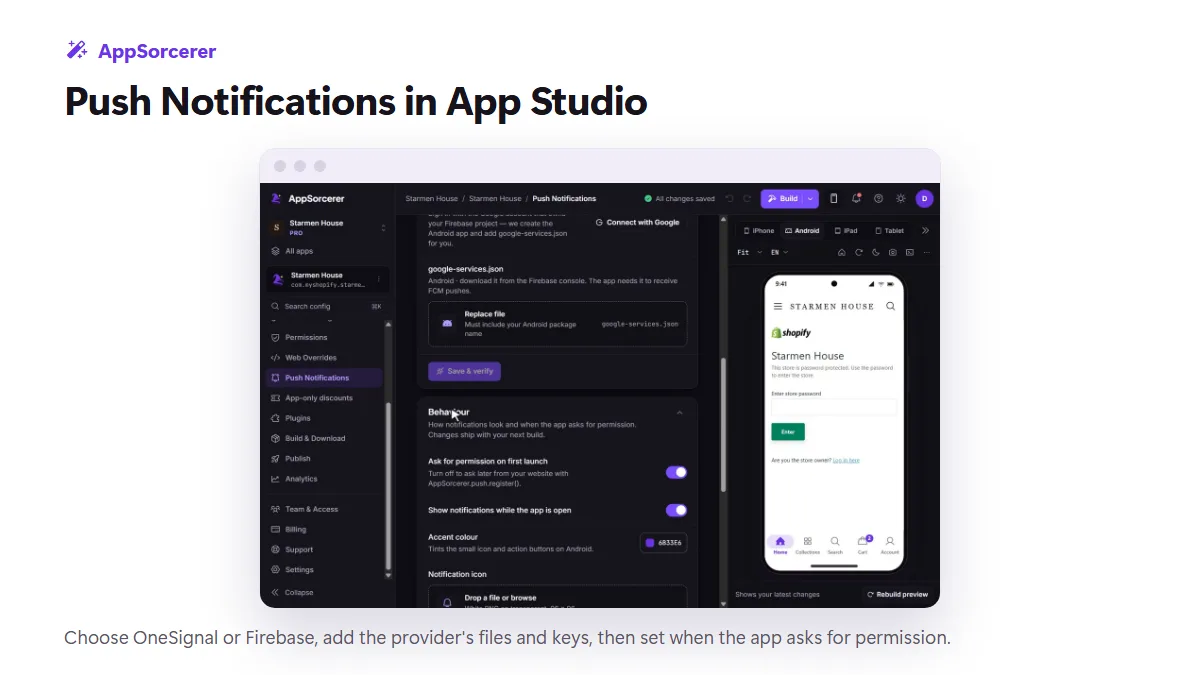
Yes, both. AppSorcerer sends push through OneSignal or Firebase Cloud Messaging, and you pick the provider in App Studio's Push Notifications section. The OneSignal plugin has its own setup guide, and the general push notifications guide covers the Firebase route.
Every AppSorcerer plan includes push through either provider, from 10,000 pushes a month on Free to 2 million on Pro. Growth, at $9 a month, adds push campaigns and automations. Shopify stores also get back-in-stock and price-drop alerts in any app built since November 2026. If you go with OneSignal, its own plan limits apply to your OneSignal account as well, so keep an eye on the 1,000 MAU cap.
Not sure yet? Build a free test app, start with Firebase because it costs nothing, and consider OneSignal once your marketing team needs its journeys and segments. The pricing page lists push allowances for every plan.
Frequently asked questions
Does OneSignal use Firebase?
On Android, yes. OneSignal needs a service account key from a Firebase project to send to Android devices that have Google Play services, so FCM still delivers the message. OneSignal handles the targeting, scheduling and reporting around it.
Is Firebase Cloud Messaging really free?
Yes. Firebase lists Cloud Messaging as a no-cost product on both of its plans, with no charge per message. You may still pay for the server or Cloud Functions that decide when to send.
Is OneSignal still free?
The Free plan still costs $0, but since autumn 2026 it covers mobile push and in-app messages only for organisations under 1,000 monthly active users. Above that, you have 24 hours to upgrade before those messages pause. Web push and email continue within their own Free plan limits.
Which is better for a Shopify store app?
It depends on who runs your messaging. If your app builder already sends campaigns and store automations, FCM is the simplest and cheapest base. If your marketing team wants its own journeys and A/B tests in one place, OneSignal is worth paying for.