What Is the Shopify Shop App? Shop App vs Your Own App
Shop is Shopify's free shopping app for consumers and a free sales channel for merchants. Here is what it does for shoppers and stores, what you can't control in it, and when your own branded app is worth adding.
On this page
- What is the Shop app?
- What does the Shop app do for shoppers?
- How does Shop work for Shopify merchants?
- Shopify Shop app vs your own app
- What can't you control in the Shop app?
- When is your own app worth it?
- How do Shop and your own app work together?
- Frequently asked questions
- Is the Shop app free for merchants?
- How do I get my store on the Shop app?
- Can I stop customers being sent to Shop for tracking?
- Is Shop the same as Shop Pay?
- Does the Shop app replace a branded app?
If you sell on Shopify, some of your customers probably already have your products on their phone, just not inside an app with your name on it. The Shopify Shop app is where they track parcels, pay with Shop Pay and browse other brands, and eligible stores are listed there without lifting a finger. That raises a fair question for any merchant thinking about a mobile app: is Shop enough, or do you need your own? This guide explains what Shop does for shoppers and for stores, what you can and can't control in it, and where a branded app still earns its place.
Short answer: The Shopify Shop app is Shopify's free shopping app for consumers. Shoppers use it to track orders, check out with Shop Pay and discover brands, and eligible Shopify stores are listed automatically with no marketplace fees. It's a good channel for finding new customers, but it belongs to Shopify: you share the screen with other brands and you don't control its notifications.
What is the Shop app?
Shop is a consumer app made by Shopify, available on Android, iOS and the web at shop.com, in countries where Shopify Payments is supported (Shopify Help Center). For shoppers it's a place to follow brands, save products, pay and track deliveries. For you it's a sales channel that appears in your admin once your store meets Shop's guidelines.
Shopify markets it hard. Its merchant page for Shop claims more than 400 million verified shoppers worldwide, and says 49% of orders placed through or referred by Shop between May 2025 and April 2026 were someone's first purchase from that brand (Shopify). Those are Shopify's own figures without a published method, but the second one tells you what Shop is built for: introductions.
What does the Shop app do for shoppers?
Four things keep people opening it:
- Order tracking. Once a shopper creates a Shop account, their orders from Shopify stores sync on their own. They can also connect Gmail or Outlook so Shop finds tracking numbers from other retailers, and they get delivery updates and a live map (Shopify Help Center).
- Shop Pay. Saved payment and shipping details mean a purchase takes a tap or two, inside Shop or on your own checkout.
- Discovery. A personalised feed, store pages to follow and collections of saved items. Shoppers can ask to be alerted when a saved product drops in price or comes back in stock.
- Shop Cash. Shoppers earn and spend it on eligible purchases.
Notice how little of that depends on your store. A customer who loves the tracking map is loyal to Shop, not necessarily to you.
How does Shop work for Shopify merchants?
The channel is free. Its listing on the Shopify App Store says you pay no marketplace fees, lists tools such as video, custom headers, collections and offers, and lets you choose whether shoppers check out inside Shop or on your online store (Shopify App Store). The same listing promises fewer abandoned carts through automatic push notifications, sent by Shop to its own users.
A few settings are worth knowing:
- Track with Shop is on by default for every store. A button on your order status page invites customers to track the order in Shop, and a Track order with Shop button also appears in the default order and shipping confirmation emails. You can turn it off under Settings > Checkout, in the Customer contact method section.
- Posts and post-purchase offers let you publish shoppable images or videos and send in-app discounts after a purchase (Shopify Help Center).
- Shop Campaigns are paid ads in Shop, on shop.com and across the Shopify Product Network. You set an average acquisition cost and pay only when a customer converts, with no upfront budget (Shopify Help Center).
- Sales tax: since 1 January 2025, Shop itself collects and remits US sales tax on orders placed in the Shop app or on shop.com that ship to or within the United States (Shopify Help Center).
Shopify Shop app vs your own app
Shop and a store app answer different questions. Shop asks "how do new people find me?", while your own app asks "how do the people who already bought come back?" Side by side:
| Shop app | Your own store app | |
|---|---|---|
| Icon on the phone | Shop's | Yours |
| Who else is in the app | Many other brands, competitors included | Only your store |
| Finding new customers | Built in: feed, search, Campaigns | You bring the traffic |
| Push notifications | Sent by Shop, can't be customised | You choose what, when and to whom |
| What shoppers saved | Hidden from you | In your own data |
| Cost | Free channel; Campaigns paid per conversion | App builder plan plus Google Play's one-time fee |
| Can disappear | Shop can remove a store at any time | Under your own developer account |
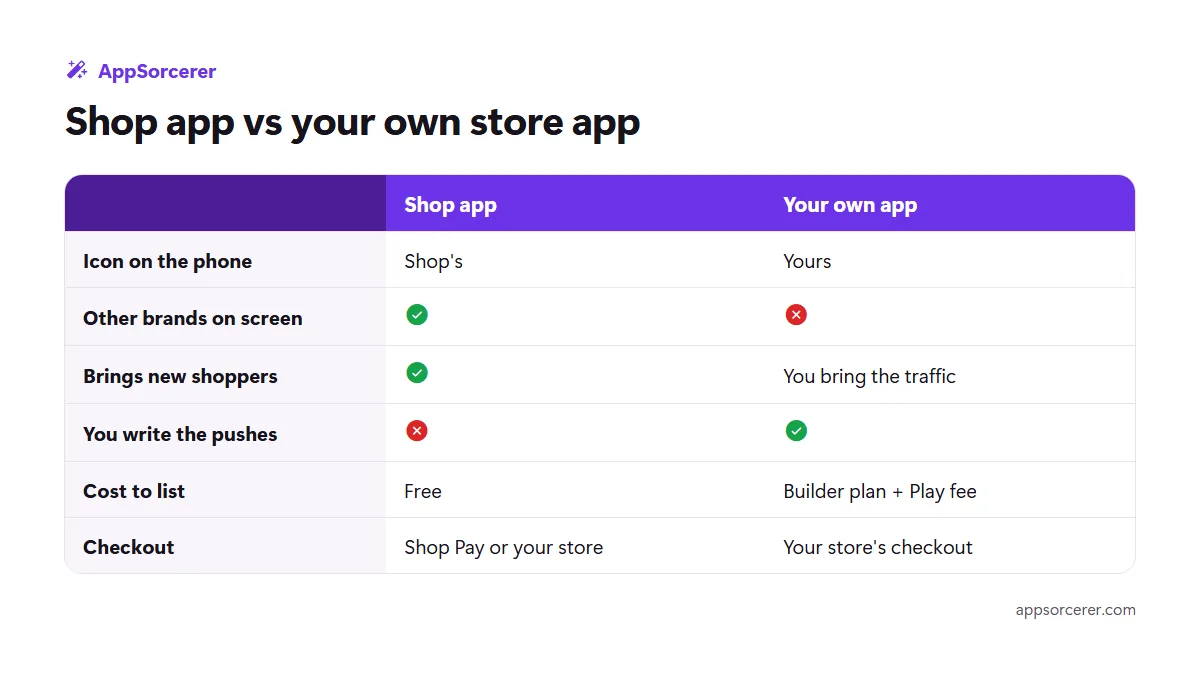
The last row is easy to overlook. Shop's merchant guidelines say it can remove a merchant or products from Shop at any time and for any reason (Shopify Help Center). Your own app still has to follow Google Play's policies, but the app, its listing and its push audience are yours.
What can't you control in the Shop app?
More than most merchants assume. Shopify says plainly that you can't see which of your products shoppers have saved, and you can't customise the notifications they receive about them (Shopify Help Center). So when a saved item comes back in stock, Shop may tell the shopper before you do, under its own name.
You also don't decide where you appear. Your products sit in a feed beside other brands, and even paid Campaign ads are recommended more or less often depending on the customer experience your store provides. None of that is a reason to leave Shop. It's a reason not to treat Shop as your retention plan.
When is your own app worth it?
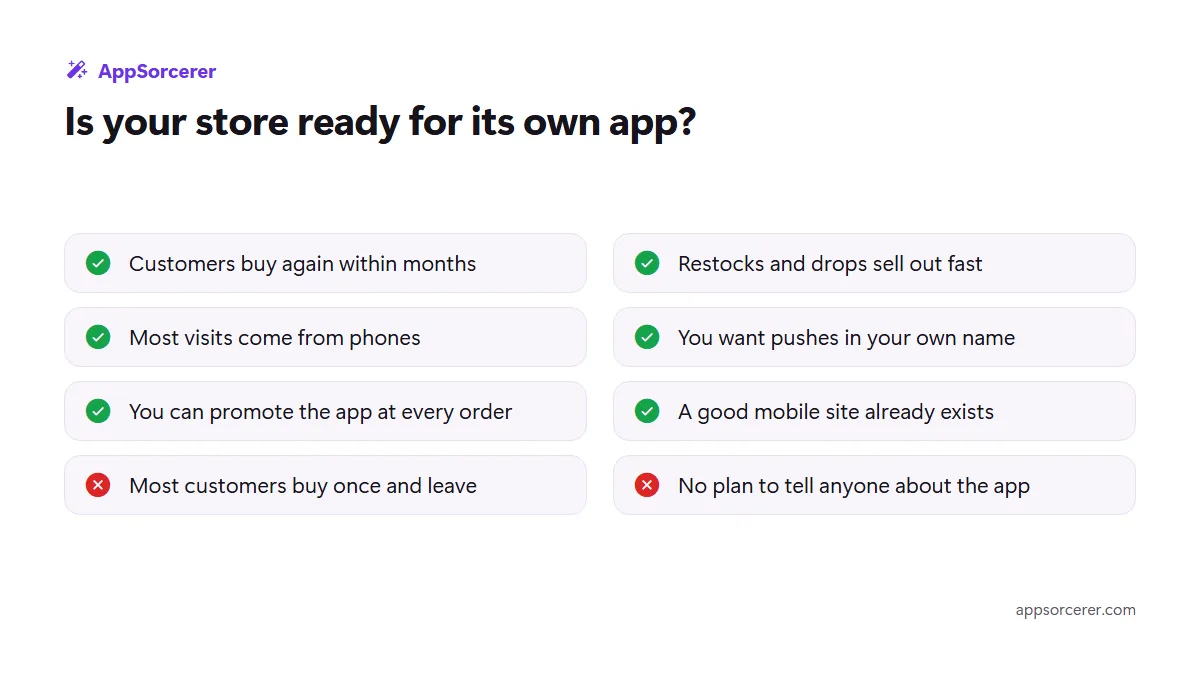
A branded app is a retention tool. It pays off when the same customers come back, because only people who install it can be reached with it. Good signs:
- Customers reorder within weeks or months: consumables, fashion drops, beauty, pet food.
- Restocks and limited drops sell out fast, so a push sent a few minutes earlier matters.
- You want abandoned-cart, restock and price-drop pushes in your own name.
- You can promote the app at every order, in emails, on the order status page and on a card in the parcel.
If most customers buy once, such as a mattress or a wedding dress, spend the money on your mobile site and on Shop instead. For a fuller tour of Shopify's own apps and the ways to get a branded one, read Does Shopify have a mobile app for your store?.
How do Shop and your own app work together?
You don't have to choose. Let Shop do the introductions, then give buyers a reason to install your app after the first order:
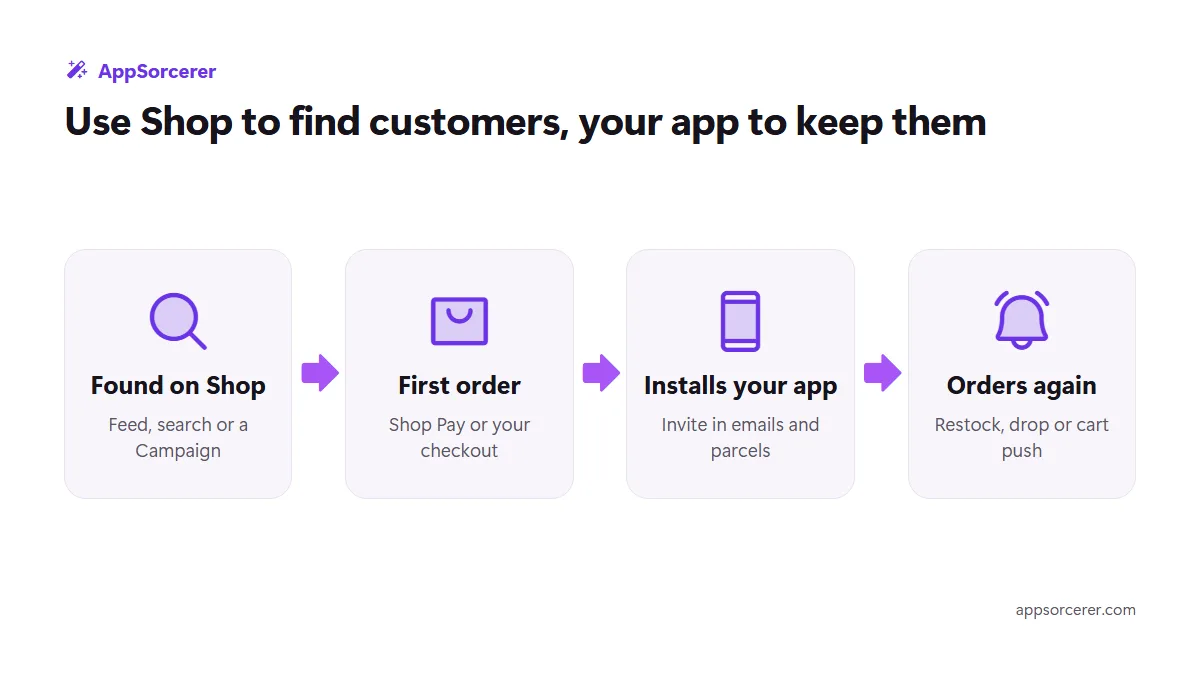
Put an app invitation in your order confirmation and shipping emails, add a QR code to the packing slip, and offer something only app users get, like early access to drops. Then send fewer, better pushes than Shop would: the restock of the size they asked about, the drop they're waiting for.
AppSorcerer turns a Shopify store into a native Android app, with iOS builds coming soon. You connect the store, open AppSorcerer from your Shopify admin to be signed in, and customise the app in App Studio with a live preview. Push notifications work through OneSignal or Firebase, and back-in-stock and price-drop pushes are live in apps built from November 2026 on. Abandoned-cart pushes come with the Growth plan and work on development stores today; on live stores they start once Shopify approves our access to order data, which is still pending. Shopify merchants are billed through Shopify. See the Shopify page for setup, or compare plans on the pricing page: store builds start on Starter at $6 a month.
Frequently asked questions
Is the Shop app free for merchants?
Yes. Listing your store in Shop costs nothing and Shopify charges no marketplace fees for sales made there. You still pay your normal Shopify plan and payment processing, and Shop Campaigns are paid ads charged when a customer converts.
How do I get my store on the Shop app?
Stores that meet Shop's merchant guidelines are listed automatically, and the Shop channel appears under Sales channels in your admin. If it hasn't appeared, check the guidelines and the product restrictions in the Shopify Help Center.
Can I stop customers being sent to Shop for tracking?
Yes. Go to Settings > Checkout and, under Customer contact method, untick the option that shows a link to track the order with Shop. Think twice before you do, because many customers like the tracking map; it makes most sense once your own app sends shipping updates.
Is Shop the same as Shop Pay?
No. Shop Pay is Shopify's accelerated checkout, which works on your own store's checkout too. Shop is the consumer app, and Shop Pay is one of the payment options inside it.
Does the Shop app replace a branded app?
No. Shop helps new shoppers find you, but its icon, feed and notifications belong to Shopify. A branded app keeps your returning customers one tap from your store and lets you decide what you send them, so many stores use both.