Shopify Customer Accounts vs Legacy Accounts Explained
Shopify's passwordless customer accounts are replacing legacy password accounts, which were deprecated in February 2026. See the differences, the upgrade steps, the 30-day revert window and what changes for your apps and mobile app sign-in.
On this page
- What are Shopify customer accounts?
- What are legacy customer accounts?
- Shopify customer accounts vs legacy: what's different?
- Are legacy customer accounts being shut down?
- How do you switch from legacy to customer accounts?
- What changes for your customers and your mobile app?
- Frequently asked questions
- Can I go back to legacy customer accounts after upgrading?
- Do customers have to create a new account after the upgrade?
- Do customer accounts work with Shopify B2B?
- Can I customise the new sign-in page?
- Will my apps break when I upgrade?
Shopify runs two account systems side by side, and only one of them has a future. Customer accounts (older articles call them "new customer accounts") sign shoppers in with a code sent by email. Legacy customer accounts (once called "classic") use a password. If you're weighing Shopify customer accounts vs legacy accounts in late 2026, the decision has mostly been made for you: legacy is deprecated. What's left to decide is when you upgrade and how to do it without breaking your theme, your apps or the sign-in inside your mobile app.
Short answer: Customer accounts are Shopify's current system. Shoppers sign in with a one-time 6-digit email code, or with Shop, Google, Facebook or Apple, and get self-serve returns, store credit and a Buy again button. Legacy accounts use an email and a password and are customised in theme code. Shopify deprecated them in February 2026 and will announce a final shutdown date, so plan the upgrade now.
What are Shopify customer accounts?
Customer accounts are account pages that Shopify hosts for you. A shopper types their email address, receives a 6-digit code and is in, with no password to create or forget. Shopify says sign-in sessions last up to 365 days, and an email address it doesn't recognise simply creates a new customer profile (Shopify Help Center).
Besides the email code, you can switch on sign-in with Shop, Google, Facebook or Apple. Shopify Plus stores can replace the whole sign-in with their own OpenID Connect provider, such as Auth0 or Okta (Shopify Help Center).
Once signed in, customers can view orders, buy again, start a return, see and spend store credit, and edit their name, email and addresses. The pages follow your checkout branding rather than your theme. By default they live on a shopify.com address, and you can connect a subdomain such as account.yourstore.com instead.
What are legacy customer accounts?
Legacy accounts are the original system: a registration page, a password and a set of Liquid templates in your theme for login, registration, account activation and password reset. Shoppers either register on that page or accept an invitation you send. Because the pages are theme code, developers could change almost anything about them, and that was the attraction.
The downside shows in Shopify's own comparison (Shopify Help Center). Legacy accounts don't support self-serve returns, store credit, saved payment methods, B2B or Markets. Customers can't change their own name or email address; they have to contact you.
Shopify customer accounts vs legacy: what's different?
Here's the side-by-side, based on Shopify's comparison page:
| Customer accounts | Legacy accounts | |
|---|---|---|
| Sign-in | One-time 6-digit email code, plus Shop, Google, Facebook or Apple | Email and password, or Shop |
| New accounts | Created on first sign-in | Separate registration page or invitation |
| Returns, store credit, Buy again | Yes | No |
| B2B and Markets | Supported | Not supported |
| Saved payment methods | Yes | No |
| Customisation | Apps and UI extensions, edited visually | Liquid templates in the theme |
| Branding | Checkout settings | Theme settings |
| Status | Current version | Deprecated since February 2026 |
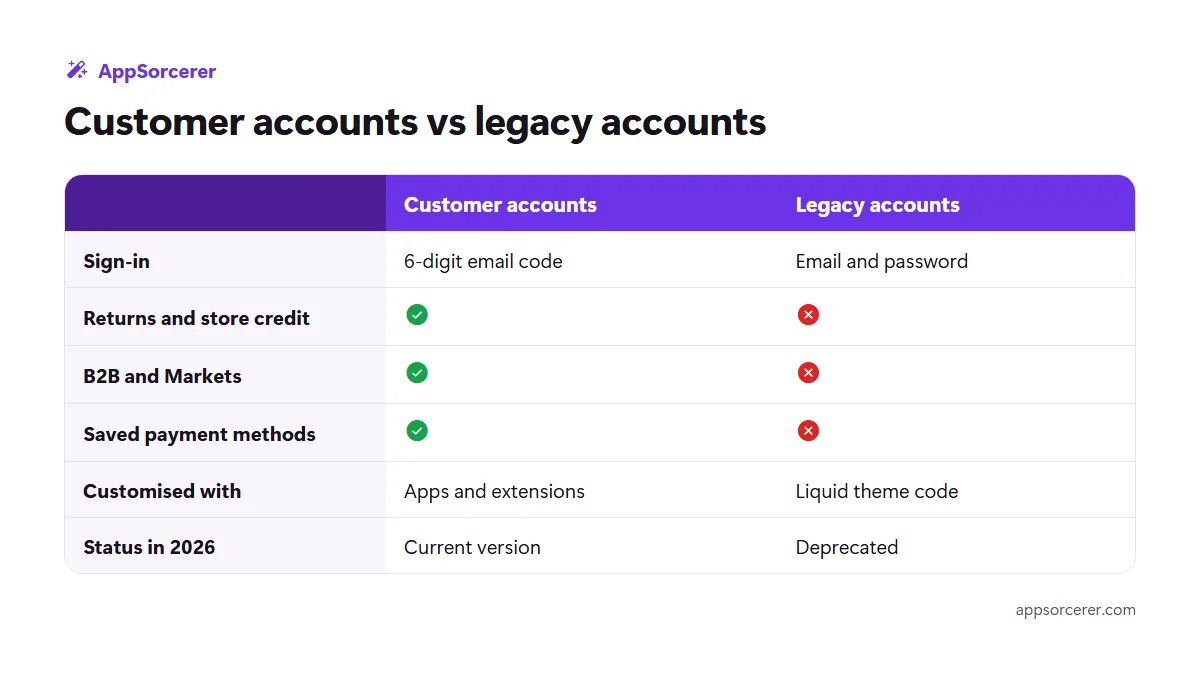
The table hides one trade-off worth naming. With legacy accounts you could rebuild the sign-in page in code. With customer accounts the sign-in page takes your logo, colours, fonts and a brand image, and that's it; you can't add custom blocks to it. Most stores won't miss that freedom, but a store with a heavily designed login page will notice.
Are legacy customer accounts being shut down?
Yes, in stages. Shopify's developer changelog from 26 February 2026 says legacy accounts are no longer offered to new stores or to stores that weren't already using them. It also says Shopify has stopped feature updates and technical support for them, and that a final sunset date will be announced later in 2026 (Shopify developer changelog). When we checked in mid-November 2026, that date hadn't appeared in the changelog yet.
The same post contains a trap for stores still on legacy. Theme developers have been told to stop shipping the legacy account templates, and a store on legacy accounts that switches to a theme without them is upgraded automatically. A routine theme change could therefore upgrade your accounts before you've checked your apps. Since July 2026, themes submitted to the Theme Store also have to show Shopify's shopify-account sign-in component in the header, on desktop and mobile (Shopify developer changelog).
App developers got a matching message: apps that depend on the legacy Liquid account pages won't work for merchants on customer accounts. Shopify says more than 800 apps have already moved to customer account extensions, and that over 70% of merchants are already on the current version.
How do you switch from legacy to customer accounts?
Shopify's upgrade guide walks through it from Settings > Customer accounts (Shopify Help Center). In short:
- Click Help me upgrade in the legacy banner. Sidekick can guide you and keep a to-do list.
- Review your legacy customisations, in the theme editor or the
customers.liquidfiles, and decide what's worth keeping. - In Settings > Checkout, duplicate your configuration and work in the draft.
- Replace code customisations with app blocks or built-in features.
- Check your brand settings, optionally connect an account subdomain, and confirm the sender email address that the sign-in codes come from.
- Publish the configuration, test every sign-in option, then click Upgrade.
You can revert within 30 days if something goes wrong.
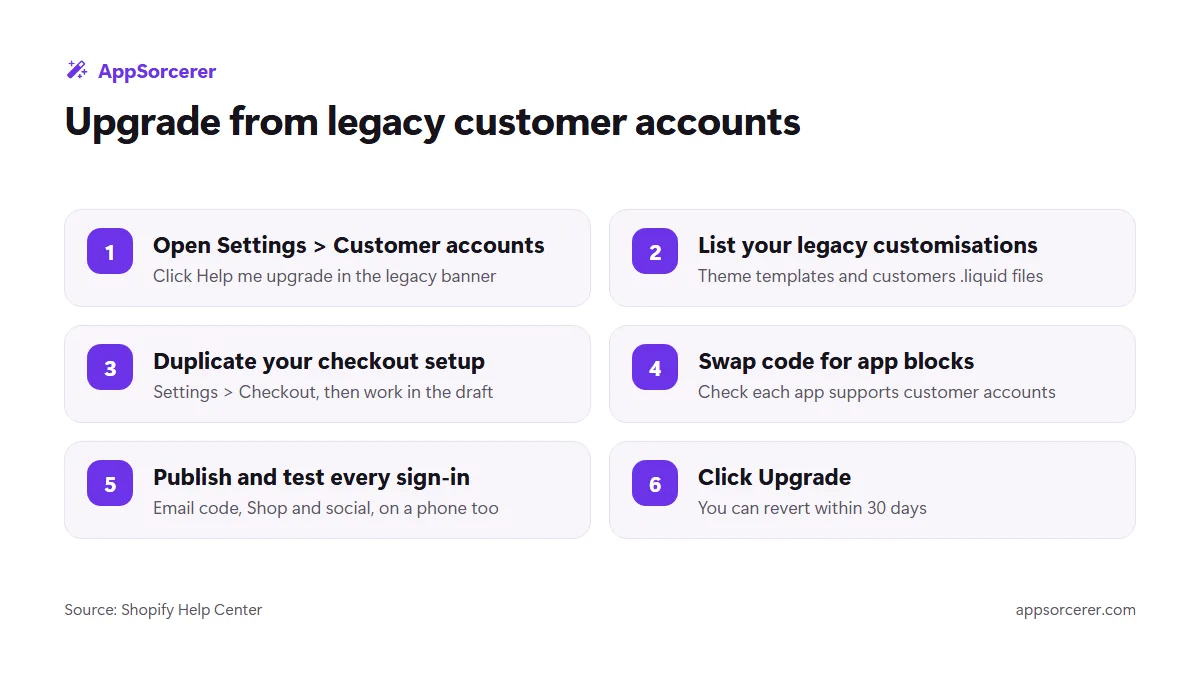
Before you click, check three things the guide flags. Custom login or registration links in your theme may need removing. Shopify Flow workflows built on the Customer account enabled trigger only fire when a customer first signs in to the new accounts, and the disabled trigger isn't supported. Customer segments that filter on the DISABLED, INVITED or DECLINED status will shift, because those customers become ENABLED the first time they sign in.
What changes for your customers and your mobile app?
For customers, very little goes wrong. Existing accounts keep working, nobody has to register again, and old addresses such as /account/login redirect to the new pages. The main thing they'll notice is that the password field has gone.
A mobile app needs more care, and it depends on how the app is built:
- Custom native or headless apps use the Customer Account API. It runs on OAuth 2.0; mobile apps count as public clients, use PKCE and need a redirect scheme in the
shop.{shop_id}format (Shopify.dev). The deprecation post also tells developers still using customer mutations in the Storefront API to move to the Customer Account API as soon as they can. - Apps that show your live store, such as a WebView app, use the same account pages as your mobile site. Make sure the account address, whether on shopify.com or your own subdomain, opens inside the app rather than in an external browser.
- Social sign-in needs its own test. Google has blocked its OAuth sign-in inside embedded web views since 30 September 2021, and blocked requests fail with a
disallowed_useragenterror (Google for Developers). The email code is the option that behaves the same everywhere.
The one-time code also adds a step on a phone: the shopper leaves your app to open their email, then comes back to type the code. Long sessions soften that, because Shopify keeps a sign-in for up to 365 days, so check that your app still holds the session after it's closed and reopened.
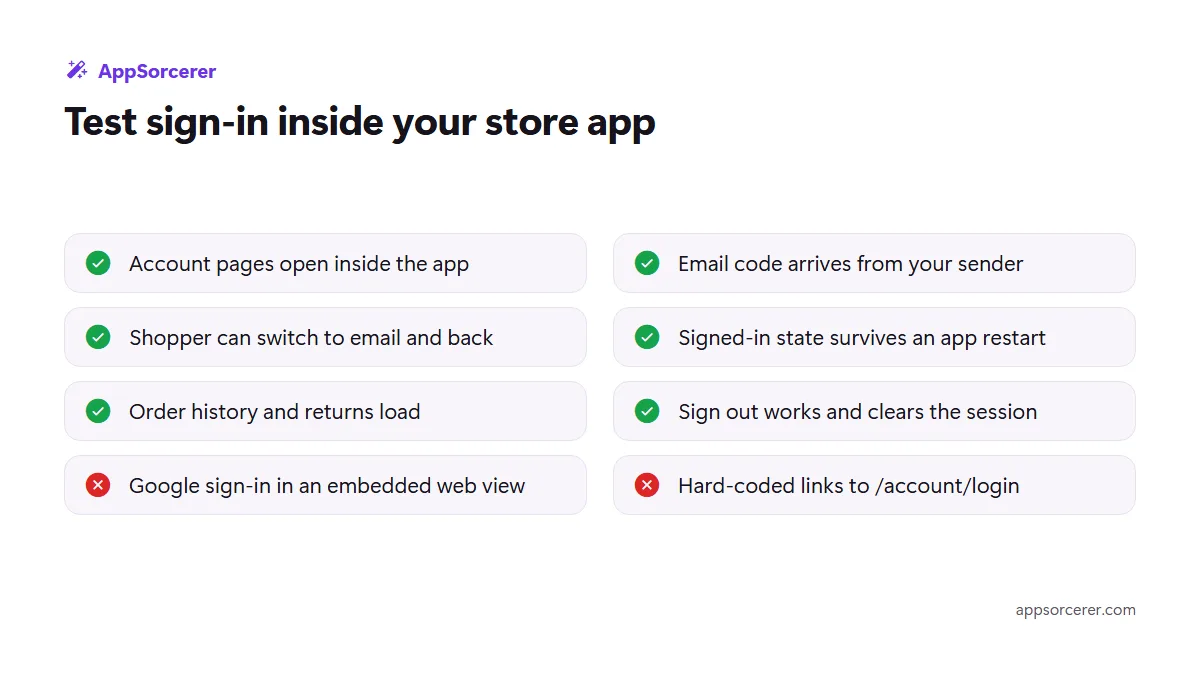
If you turn your Shopify store into an app with AppSorcerer, the app shows your live store, so customers sign in with the same accounts they use on your site. Link rules decide whether each address opens in the app, in a browser or outside the app; the link rules guide shows how to set them. Run through the checklist above on a real Android phone before you publish.
Frequently asked questions
Can I go back to legacy customer accounts after upgrading?
Only within 30 days of the upgrade. After that, and for any store that wasn't already using legacy accounts, Shopify doesn't offer them, because they're deprecated and closed to new users.
Do customers have to create a new account after the upgrade?
No. Existing customers sign in with the same email address and receive a code instead of typing a password. Their orders and addresses are still there, and old legacy sign-in links redirect to the new pages.
Do customer accounts work with Shopify B2B?
Yes. B2B and Markets work with customer accounts, while legacy accounts support neither. If you sell wholesale through Shopify, that alone is a reason to upgrade.
Can I customise the new sign-in page?
Only its branding: logo, colours, fonts and a brand image. The account pages after sign-in can be extended with app blocks and customer account UI extensions, but the sign-in page itself doesn't take custom blocks.
Will my apps break when I upgrade?
Apps that inject content into legacy Liquid account pages won't work on customer accounts. Check each app's listing or ask its developer whether it supports customer accounts before you upgrade. If you're also planning a store app, see how AppSorcerer handles Shopify stores or start free with a test build.