Shopify Back in Stock Notifications: Email, SMS or Push?
Shopify has no built-in restock alert for shoppers. Here is what Shopify Flow and the Shop app do, how email, SMS and app push compare for back-in-stock alerts, a setup you can copy and the numbers to track.
On this page
- Does Shopify have built-in back in stock notifications?
- How do restock alerts work on Shopify?
- Email, SMS or push: which channel should you use?
- How to set up Shopify back in stock notifications
- What should a back-in-stock alert say?
- Which numbers show your restock alerts are working?
- Back-in-stock and price-drop pushes in AppSorcerer
- Frequently asked questions
- Does Shopify send back-in-stock emails automatically?
- Can I send back-in-stock alerts without an app?
- Should I hide sold-out products on Shopify?
- What if only a few units come back?
- Do price-drop alerts work the same way?
A sold-out product page is one of the few places where a shopper has already told you exactly what they want. Give them no way to leave their details and most will close the tab and buy somewhere else. Shopify back in stock notifications close that gap: the shopper asks to hear when a variant returns, and a message goes out when it can be bought again. This guide covers what Shopify does on its own, how the channels compare, a setup you can copy and the numbers worth watching.
Short answer: Shopify doesn't send restock alerts to your shoppers out of the box. You add them with a back-in-stock app, handle part of the job in Shopify Flow, or send pushes from your own store app. Email is the sensible default for everyone, SMS earns its cost on fast-selling or pricey items, and app push suits repeat buyers who already have your app installed.
Does Shopify have built-in back in stock notifications?
Not for shoppers. Shopify can react when stock changes, but it doesn't collect restock requests or keep a list of people waiting for a variant.
The closest native tool is Shopify Flow. Since August 2023 it has offered a Product variant back in stock trigger, which starts a workflow when a variant's inventory climbs from zero or less to one or more (Shopify changelog). The actions you can attach work on the product itself: tags, collections, publishing, redirects and metafields (Shopify Help Center). That's handy for merchandising. None of it knows which shoppers asked about size 10.
Two limits on that trigger are easy to miss. It only fires for products that have inventory tracking switched on, and draft orders don't move the count until they're converted into real orders.
There's also an alert you may not know your shoppers already get. Anyone who saves one of your products in Shopify's Shop app can turn on notifications for a price drop or a restock. Shopify states plainly that merchants can't see which products customers saved and can't customise those notifications (Shopify Help Center). It's a free bonus, but it carries Shop's name, not yours, and you'll never see the numbers.
How do restock alerts work on Shopify?
Almost every back-in-stock app runs the same loop:
- A shopper opens a sold-out variant. Instead of a dead "Sold out" button they see Notify me when available.
- They leave an email address or a phone number, or tap once if they're in your app and have allowed notifications.
- The request is saved against that exact variant, so a restock of size 8 doesn't wake up the people waiting for size 10.
- Inventory goes back above zero, from a delivery, a return or a stock sync.
- The alert goes out with a link straight to that variant, and the request closes.
Step 5 is where stores get into trouble. Picture 400 people waiting for a jacket when 12 units arrive: send 400 messages at once and you create 388 disappointed customers in a few minutes. Better apps let you release alerts in batches; Amp, a restock app with more than 1,000 reviews on the Shopify App Store, lists batch sending among its features and sends by email, SMS and web push (its listing). If your app can't batch, at least say "only a few are back" in the message so the race is honest.
Email, SMS or push: which channel should you use?
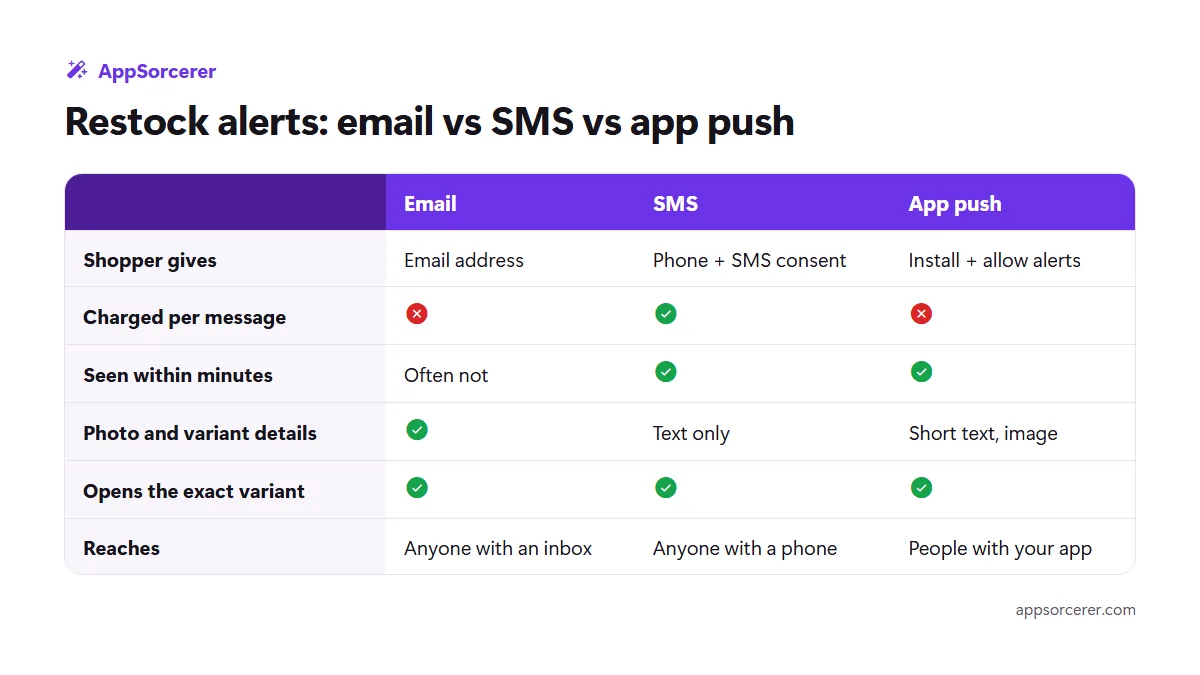
Each channel asks something different of the shopper and costs you something different. For restock alerts specifically, they line up like this:
| Channel | What the shopper gives | What it costs you | Where it shines | Where it falls short |
|---|---|---|---|---|
| An email address | Usually inside your email plan | Photos, sizes, related items | Can sit unread for hours | |
| SMS | A phone number and SMS consent | Paid per message, by country | Read within minutes | Expensive at volume, little room |
| App push | Installs your app, allows notifications | Inside your app plan's push allowance | Lock screen, opens the product in the app | Only reaches people with your app |
| Shop app alert | Saves the product in Shop | Nothing | No setup at all | You can't see, change or measure it |
Shopify's own messaging tool bills SMS and WhatsApp per message at the rate of each recipient's region (Shopify Help Center), and restock apps generally price texts the same way. That's why SMS needs a filter. Offer it on items that sell out within days, or that cost enough for one recovered order to pay for a few hundred texts.
Email should be the default because nearly every shopper has an address and the message has room for the photo, the option they picked and the price. App push is the fastest channel you don't pay for per message, with a catch: on Android 13 and later, a newly installed app's notifications stay off until the shopper allows them (Android Developers). A "Notify me" tap is a natural moment to ask for that permission, because the shopper can see why you want it.
How to set up Shopify back in stock notifications
A setup that works for most stores, in this order:
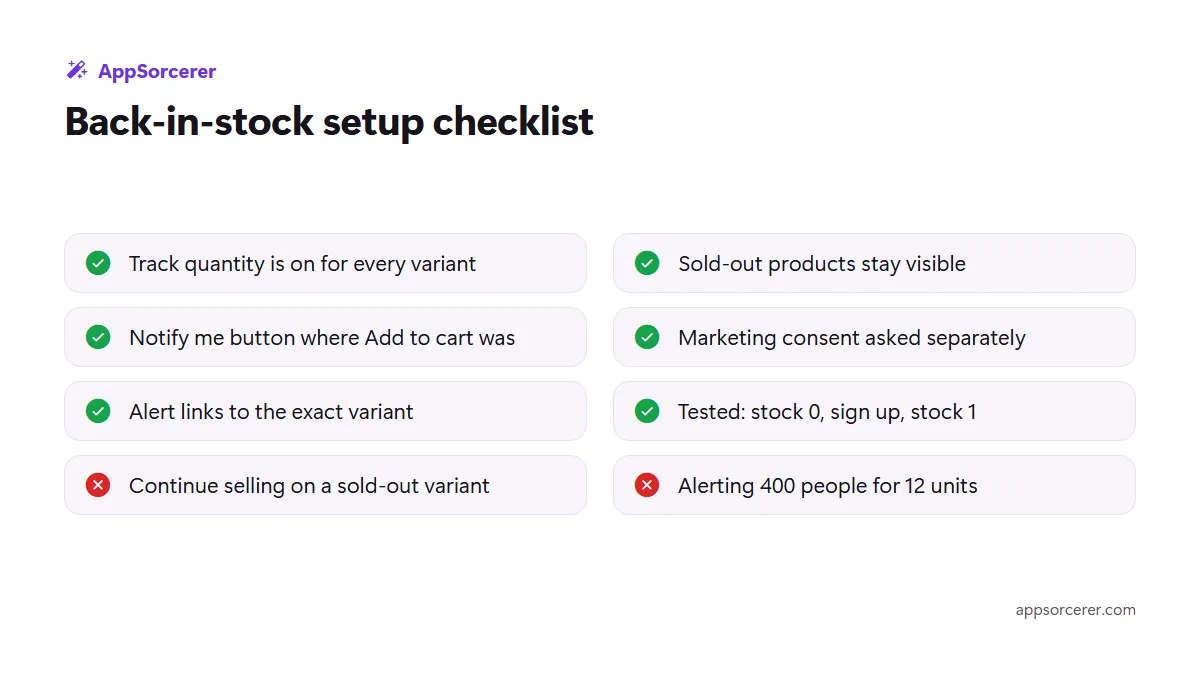
- Track inventory. In each product's Inventory section, turn on Track quantity. Without it Shopify never treats a variant as sold out, and nothing can fire.
- Keep sold-out products visible. A hidden product collects no sign-ups. Also check Sell when out of stock: if a variant is set to continue selling, it never looks sold out, so no button appears.
- Install a restock app and put the button where Add to cart was. Test it on a phone first, because a cramped form hurts most on a small screen.
- Ask for marketing consent separately. A restock request isn't permission to send your newsletter. Use a separate, unticked box.
- Write the message. Product name, the option they asked about, a photo, the price and one tap to the variant page.
- Test it end to end. Set a test variant to 0, sign up with your own email and phone, then raise stock to 1. Shopify suggests the same change from 0 to 1 when you test the Flow trigger.
- Use Flow for the back office. Hook the back-in-stock trigger up to republish the product, add it to a "Back in stock" collection or remove a "sold-out" tag.
What should a back-in-stock alert say?
Keep it short and specific. The shopper already wants the item, so you don't need to sell it to them again. Name the product and the variant, say it's available now, and make the tap land on that variant with the option already selected, not on your home page.
A price-drop alert needs both prices. "Prices have dropped" reads like an ad; "Now $38, down from $45" reads like the answer to a question the shopper asked. Here are two examples written for a store app:
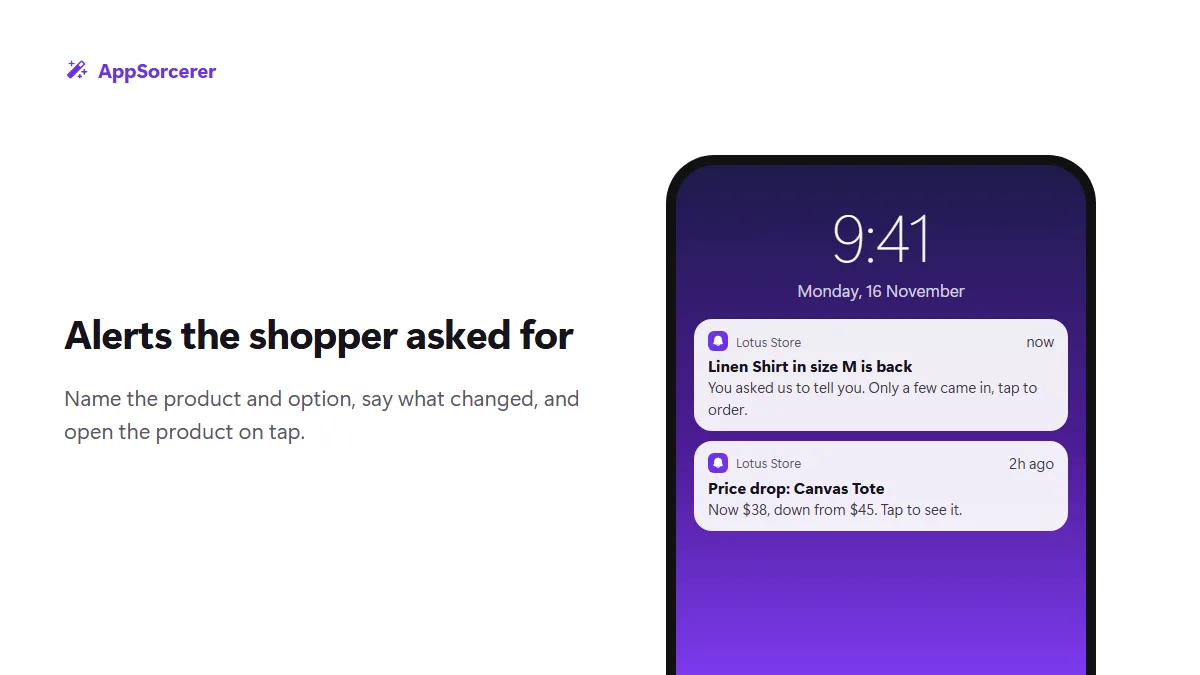
One alert per request is usually right. For email you might add a single reminder a day later if the item is still in stock; treat that timing as a starting point to test, not a rule. For SMS and push, one message is plenty.
Which numbers show your restock alerts are working?
App vendors publish conversion figures for back-in-stock flows, but they rarely explain how they measured them, so compare against your own baseline instead. Check these once a month:
- Sign-up rate: requests divided by views of sold-out variant pages. A low rate usually means the button is hard to spot or the form asks for too much.
- Open or click rate by channel. If SMS isn't clearly beating email on clicks, the extra cost isn't buying you anything.
- Alert conversion: orders from alert clicks divided by alerts sent, inside a fixed window. Pick one, such as three days, and keep it.
- Revenue per alert, which tells you whether texts pay for themselves.
- Waiting list by variant. This is free demand data for your next purchase order. 150 requests for size M against 6 for XXL is a buying decision.
- Opt-outs after each send, especially on push and SMS, where people switch you off quickly.
Back-in-stock and price-drop pushes in AppSorcerer
AppSorcerer turns a Shopify store into a native Android app, with iOS builds coming soon. Back-in-stock and price-drop pushes are live in apps built from November 2026 on, so an app built before that needs a fresh build to get them. They're sent through OneSignal or Firebase Cloud Messaging and sit with the other push automations, which are included from the Growth plan ($9 a month).
Setup, timing and the text placeholders are covered in the Shopify push automations guide. For the wider picture, including welcome and shipping pushes, read our guide to Shopify push notifications.
A sensible mix for a store with an app: push for people who have it, email for everyone else, and SMS only for the drops that vanish fastest. To try it on your own catalogue, start free with a test build, or compare the plans on the pricing page.
Frequently asked questions
Does Shopify send back-in-stock emails automatically?
No. Shopify has no built-in restock email for shoppers who ask about a sold-out item. You need a back-in-stock app, or your own store app with restock pushes. Shopify Flow can react to a restock, but it doesn't keep a list of who is waiting.
Can I send back-in-stock alerts without an app?
Only partly. Flow's back-in-stock trigger tells you when a variant returns, and you can use it to republish or tag the product. Collecting requests from shoppers and sending each of them an alert still needs an app or custom development.
Should I hide sold-out products on Shopify?
Not if you plan to restock them. A visible sold-out page with a Notify me button keeps collecting demand and gives you a waiting list to order against. Hide or redirect only the products you've discontinued.
What if only a few units come back?
Send alerts in batches, or say plainly that stock is limited. Notify the earliest sign-ups first, see what sells, then notify the next group. Alerting everyone for a handful of units mostly produces annoyed shoppers.
Do price-drop alerts work the same way?
Mostly. The shopper follows a product rather than a sold-out variant, and the alert fires when the price falls. Set a minimum drop so a tiny change doesn't trigger a message, and always show the old and the new price.