PWA vs Native App: Pros, Cons and When to Choose
PWAs can now send push on iPhone and be listed on Google Play, so the old rules have changed. We compare PWAs, native apps and WebView wrappers on install, push, offline use and cost, with a decision guide.
On this page
- What is the difference between a PWA and a native app?
- PWA vs native app: how do they compare?
- What can a PWA do in 2026?
- Installing
- Push notifications
- Offline use and device access
- Can you put a PWA on Google Play?
- When is a native app worth the cost?
- Where does a WebView app fit between the two?
- How do you choose between a PWA, a wrapper and native?
- Frequently asked questions
- Is a PWA cheaper than a native app?
- Do PWAs work offline?
- Can a PWA send push notifications on iPhone?
- Can I start with a PWA and build an app later?
A progressive web app (PWA) is a website that people can install and, if you build it that way, use offline. A native app is built with Android's or Apple's own tools and installed from an app store. The pwa vs native app decision used to be easy: native for features, PWA for budget. Two changes moved the line. iPhones gained web push for Home Screen web apps in iOS 16.4, and Google Play accepts PWAs packaged as Trusted Web Activities. This guide covers what each option can do in November 2026, where WebView wrappers sit between them, and how to pick.
Short answer: Choose a PWA when most people find you through search and links, you want one codebase, and a browser install is enough. Choose a native app when you need deep device access, long offline sessions or very fluid animation. If you mainly want a Play Store listing and push for a site you already have, a TWA or WebView wrapper costs far less than going native.
AppSorcerer sells WebView apps for Android, so we have a stake in the middle option. We've tried to keep the PWA and native sections fair, and the platform facts below link to the browser or platform vendor's own documentation.
What is the difference between a PWA and a native app?
A PWA is your website plus a web app manifest. MDN lists what Chromium browsers look for before they offer an install: a name or short_name, a 192px and a 512px icon, a start_url, a display mode, and HTTPS (MDN: Making PWAs installable). A service worker isn't needed for installation, but it's the part that gives you offline pages and push.
A native app is written with the platform's own SDK, usually Kotlin on Android and Swift on Apple devices. It ships through Google Play or the App Store, and every release is a new build that passes store review before people get it.
Two kinds of wrapper sit between those poles:
- Trusted Web Activity (TWA): a small Android app that opens your PWA full screen inside the user's browser, Chrome 72 or later. The site has to prove it belongs to the same developer through Digital Asset Links, and the app can't read the page's cookies or local storage (Android Developers).
- WebView app: an app that renders your site in its own WebView and adds native parts around it, such as tabs, a top bar, push and an offline screen. We compared that route with fully native apps in WebView vs native app, so this article won't repeat it.
PWA vs native app: how do they compare?
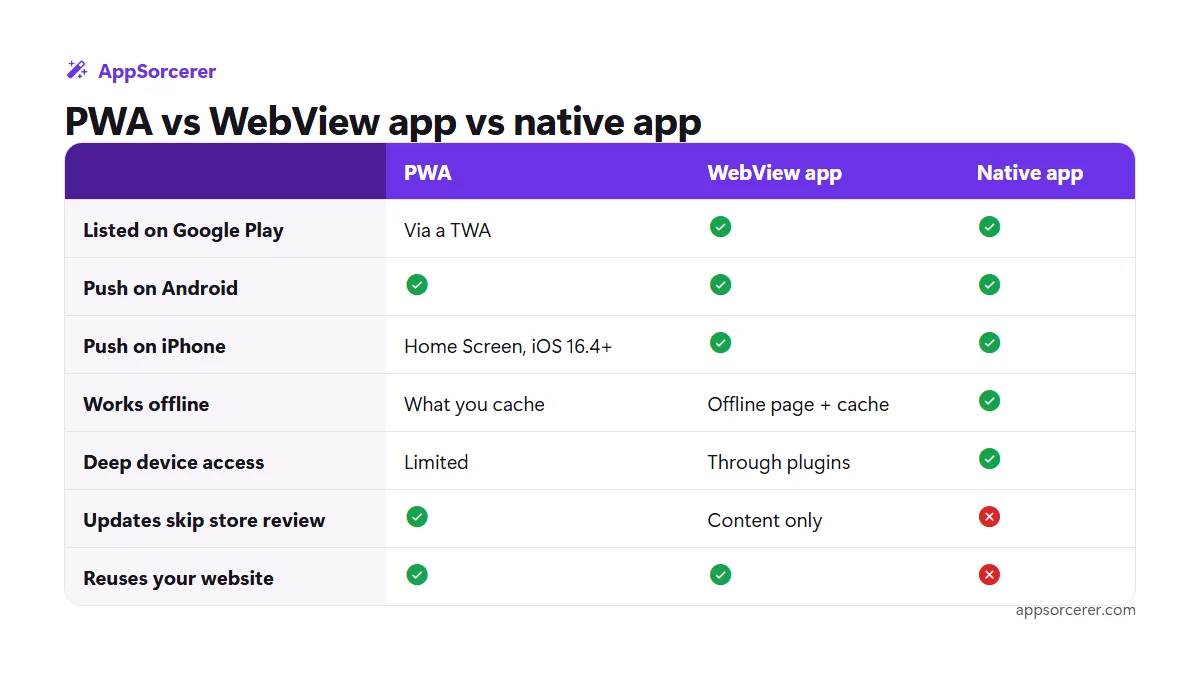
The table adds the WebView app as a third column, because for many stores and publishers it's the realistic alternative to both.
| PWA | WebView app | Native app | |
|---|---|---|---|
| How people get it | Install from the browser, or Add to Home Screen | Google Play or the App Store | Google Play or the App Store |
| Store listing | Optional, through a TWA on Google Play | Yes | Yes |
| Push on iPhone | Only once added to the Home Screen (iOS 16.4+) | Native push | Native push |
| Offline | Whatever your service worker caches | Offline screen and cached pages | Full offline use, if designed for it |
| Device features | Web APIs, with fewer on iPhone | Web APIs plus native plugins | Anything the OS exposes |
| Updates | Live as soon as you deploy the site | Content is live; shell changes need a new build | New build and store review each time |
| What you maintain | Your website | Your website and an app shell | One codebase per platform, or a cross-platform one |
Sources: MDN, WebKit and Android Developers, checked in November 2026.
What can a PWA do in 2026?
More than most comparison posts give it credit for, with a few sharp edges on iPhone.
Installing
On Android, Chrome installs a PWA as a WebAPK, so it appears in the launcher, the app switcher and system settings like any other app. MDN adds a catch: that only happens on devices with Google Mobile Services. On iPhone, iOS 16.4 and later let people install from the Share menu in Safari, Chrome, Edge, Firefox and Orion. What iOS lacks is the beforeinstallprompt event, so you can't show your own Install button there. You have to teach visitors the Share, then Add to Home Screen steps.
Push notifications
Apple added Web Push for Home Screen web apps in iOS and iPadOS 16.4 (WebKit). Three conditions decide whether it works for you. The visitor must add your site to the Home Screen first. Your manifest's display value must be standalone or fullscreen, or the icon is saved as a plain bookmark. And the permission request has to follow a tap, such as a Subscribe button, not fire on page load. A shopper who browses in Safari and never installs your PWA can't receive your pushes at all. The Push API itself is listed on MDN as widely available across major browsers since March 2023 (MDN: Push API), so the Home Screen rule is an extra condition on Apple devices rather than a gap in the standard.
Offline use and device access
A service worker can cache pages, images and data so the app opens without a signal. Past that, support depends on the browser engine. Google's own PWA course says Apple's engine is missing APIs such as Web Bluetooth and Web NFC, and that people can't install a PWA from in-app browsers like the ones inside Facebook or Gmail (web.dev). If much of your traffic arrives from social apps, that second limit matters more than it first sounds.
Can you put a PWA on Google Play?
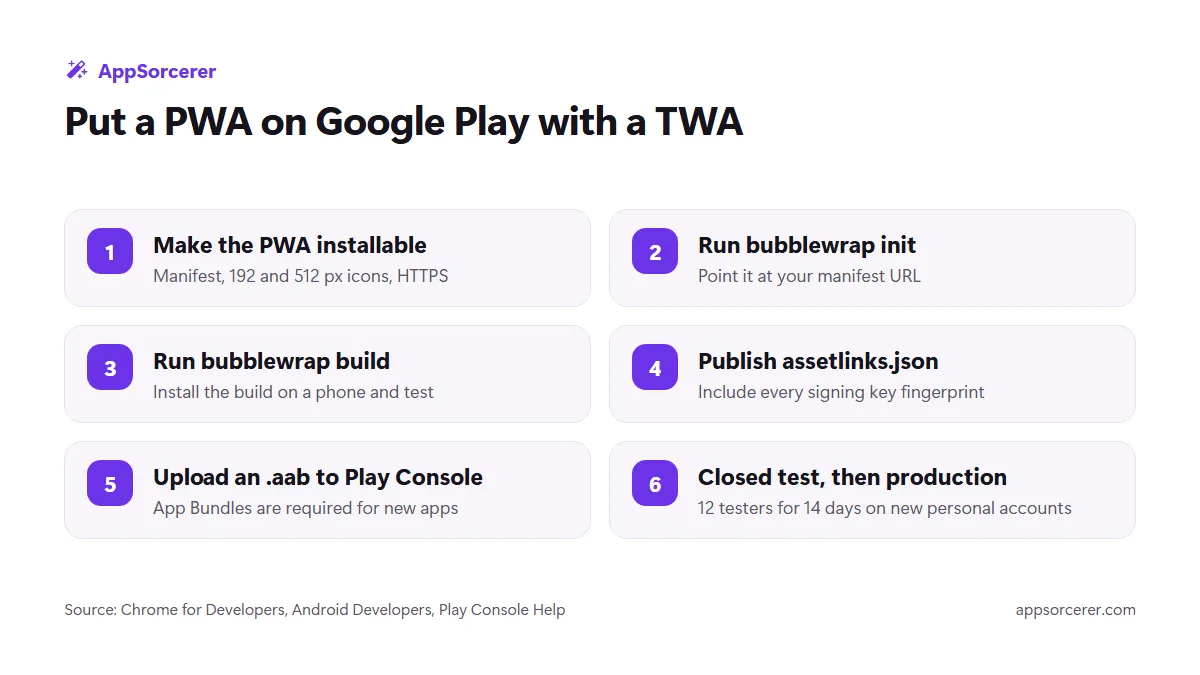
Yes. Google's Bubblewrap command-line tool wraps a PWA in a Trusted Web Activity, and the steps are short (Chrome for Developers quick start):
- Make the PWA installable: manifest, both icon sizes, HTTPS.
- Run
bubblewrap init --manifest=https://example.com/manifest.jsonand confirm the package name and signing key it proposes. - Run
bubblewrap buildand install the result on a phone to test it. - Publish
/.well-known/assetlinks.jsonon your domain with the app's signing certificate fingerprint. If Google Play signs the app with its own key, that fingerprint has to be in the file too. A mismatch is a common cause of failed verification, and the app then opens as a Custom Tab with a browser bar at the top. - Upload to Play Console. New apps must be Android App Bundles, a rule Google Play has applied since August 2021 (Android Developers), so check that you're uploading an .aab file.
- Personal developer accounts opened after 13 November 2023 face one more gate: Google wants 12 or more testers enrolled in a closed test, each staying opted in for 14 consecutive days, before you can apply for production (Play Console Help). Our 12-tester guide covers that part.
TWAs are an Android feature. For other stores, MDN points to PWABuilder for packaging, including for the Microsoft Store and Apple's App Store, but each store runs its own process.
When is a native app worth the cost?
Native earns its price when the app is the product rather than a window onto your website. Good signs:
- Long background work, such as workout tracking, navigation or large uploads.
- Bluetooth or NFC hardware, especially for iPhone users, where the web APIs aren't available.
- Offline-first use, where people work for hours with no connection.
- Heavy graphics: games, AR, video editing.
- A team that can maintain two codebases, or one cross-platform codebase, for years.
If your app would mostly show product pages, articles or bookings that already live on your site, native means paying to rebuild what you have. That's the case where the wrappers win.
Where does a WebView app fit between the two?
A WebView app is the pragmatic middle for stores and content sites. You keep one website, but you get a real Play Store listing, native push that doesn't depend on a Home Screen install, and native navigation. Compared with a TWA, the shell can do more: tab bars, link rules that send some URLs to the browser, an offline screen, and plugins for things like biometrics or a QR scanner. App review is the trade-off, since stores expect more than a repackaged website; our note on WebView app approval explains what helps.
That's the kind of app AppSorcerer builds. You set it up in App Studio, preview it live in the browser, and download an Android build: test APKs on the Free plan, store-ready AAB files from the $6 Starter plan. AppSorcerer builds Android apps today, and iOS builds are coming soon. Push runs through OneSignal or Firebase Cloud Messaging, as the push notification docs describe.
The weakness is shared with PWAs: the app is only as quick as your mobile site. Fix slow pages first, whichever route you choose.
How do you choose between a PWA, a wrapper and native?
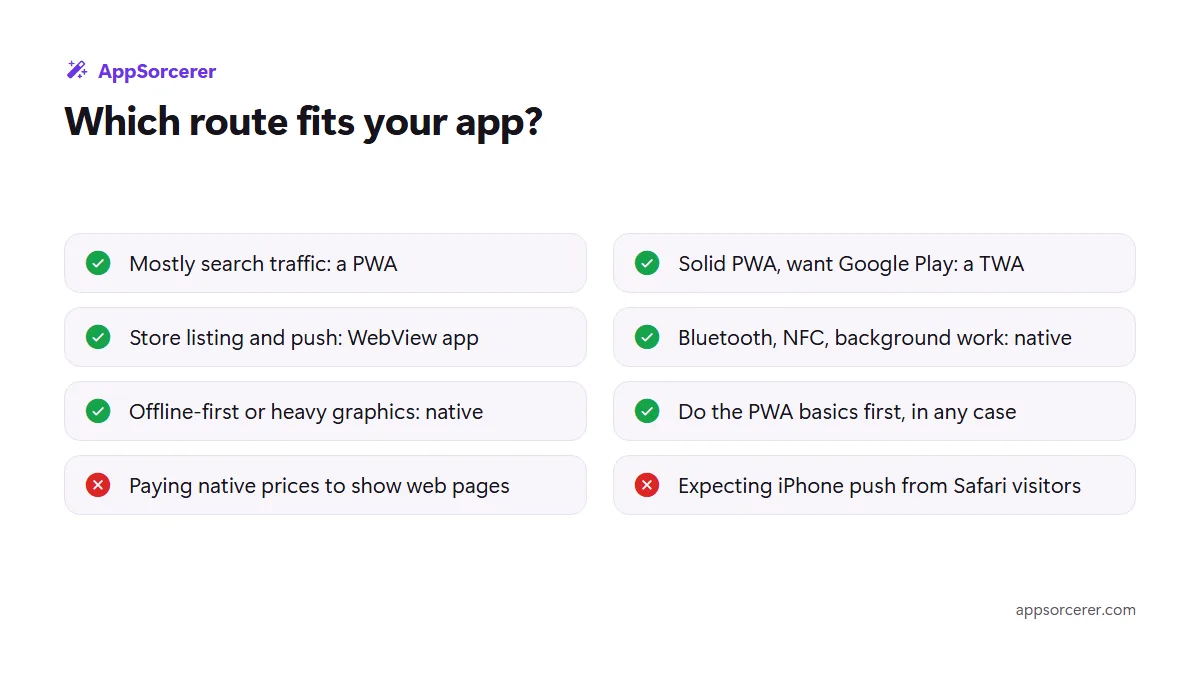
Match the route to where your users come from and what the app must do:
- Most visitors arrive from search and you want the least friction: a PWA. It costs developer time, not a subscription.
- You want a Play Store listing and your site is already a solid PWA: a TWA built with Bubblewrap.
- You want a store listing, reliable push and native navigation without a rebuild: a WebView app.
- The app must do work your website can't, like Bluetooth, background tasks or offline-first use: native.
- Still unsure: do the PWA basics anyway. A manifest, HTTPS and a service worker improve your mobile site, and every other route reuses that work.
Frequently asked questions
Is a PWA cheaper than a native app?
Usually, yes. A PWA reuses your website, so the extra work is a manifest, icons and a service worker. A native app is a second product, with its own code, releases and store reviews on each platform.
Do PWAs work offline?
They can, if the service worker caches the pages and data people need. Installing a PWA doesn't make it work offline by itself. Without caching, the installed app shows the same connection error as the browser.
Can a PWA send push notifications on iPhone?
Yes, on iOS 16.4 and later, but only after the person adds the PWA to the Home Screen and taps to allow notifications. Visitors who only browse in Safari can't receive web push from your site.
Can I start with a PWA and build an app later?
Yes. The manifest, icons and fast mobile pages you build for a PWA carry over to a TWA or a WebView app, so none of that work is lost. Only a native rebuild starts from scratch.
If your mobile site is already in good shape, the quickest real-world test is a WebView build: create a free AppSorcerer account, point it at your site and install the test APK on your phone. Build limits for each plan are on the pricing page.