Best No-Code App Builders for Android in 2026
Website-to-app wrappers, visual builders like FlutterFlow, Adalo and Thunkable, or AI web app tools? We compare no-code Android builders on Google Play publishing, AAB builds, push, price and lock-in.
On this page
- What kinds of no-code Android builders are there?
- What should a no-code app builder for Android handle?
- Which no-code Android builders are worth a look?
- Website-to-app builders: AppSorcerer, AppMySite and Natively
- FlutterFlow: if you might want the code
- Adalo: database apps with an AI start
- Thunkable: simple apps, but watch the subscription
- Glide and AI web app builders: not for the Play Store
- How much does it cost to publish an Android app without code?
- How do you choose the right builder?
- Frequently asked questions
- Can I build an Android app for free without coding?
- How is an APK different from an AAB?
- Do apps made with no-code builders get approved on Google Play?
- Will my app keep working if I stop paying the builder?
A no-code app builder for Android lets you put an app on Google Play without writing Kotlin or opening Android Studio. That label now covers three very different kinds of tool: builders that wrap an existing website, visual builders where you design screens and data, and AI builders that start from a prompt. Some of them can't publish to Google Play at all. This guide sorts them by type, lists what to check before you pay, and gives honest fit notes on seven tools, with plan details checked on each vendor's site in November 2026.
Short answer: If you already have a website or Shopify store, use a website-to-app builder such as AppSorcerer, AppMySite or Natively. For a new app with its own screens and data, pick a visual builder: FlutterFlow if you may want the source code later, Adalo for database apps, Thunkable for simple projects. Glide, and AI builders such as Lovable, make web apps, not Play Store apps.
AppSorcerer is one of the tools on the list, so we have a stake in the answer. We've described each tool's strengths from its own pages and put our own limits in writing.
What kinds of no-code Android builders are there?
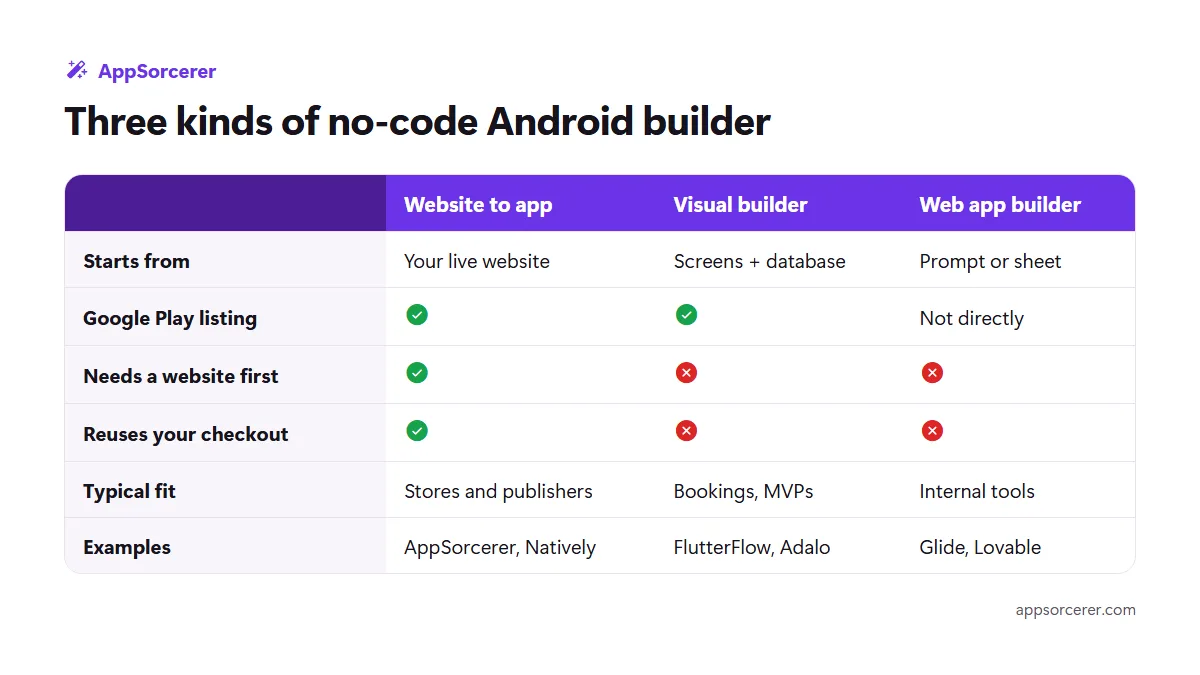
Most tools fall into one of three groups, and the group matters more than the brand.
Website-to-app builders take a site you already run and show it inside a native Android app, adding tabs, push notifications and an offline screen around it. Your products, articles and checkout keep working because they're still your website. AppSorcerer, AppMySite, Natively and Median work this way.
Visual builders let you design screens, connect a database and add logic by dragging components. The result is an app in its own right, not a copy of a site. FlutterFlow, Adalo and Thunkable are the best-known names, and they suit bookings, directories, internal tools and MVPs.
AI builders generate the first version from a description. Several builders now include one, such as Adalo's Ada, FlutterFlow's AI tools and AppMySite's AI builder. Others produce web apps. Lovable's own guide describes its apps as web apps you install as a PWA, and points to a Trusted Web Activity for a Play Store listing (Lovable).
What should a no-code app builder for Android handle?
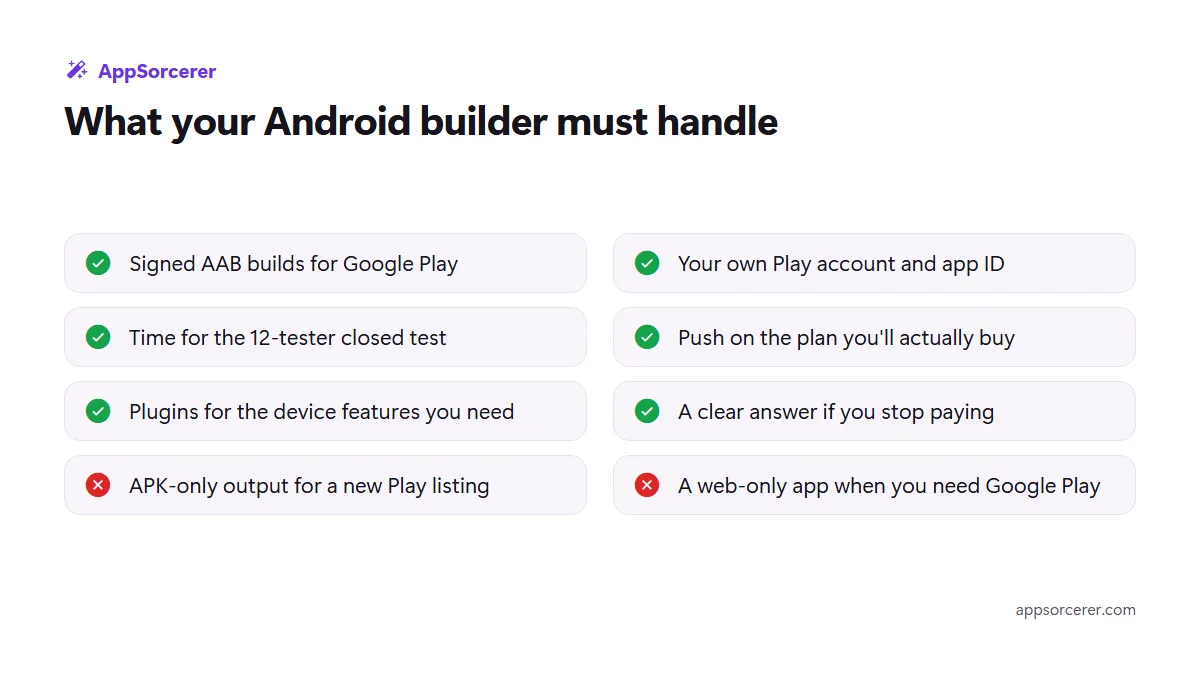
Before comparing prices, check that a builder clears these basics. Missing any one of them can stall a launch.
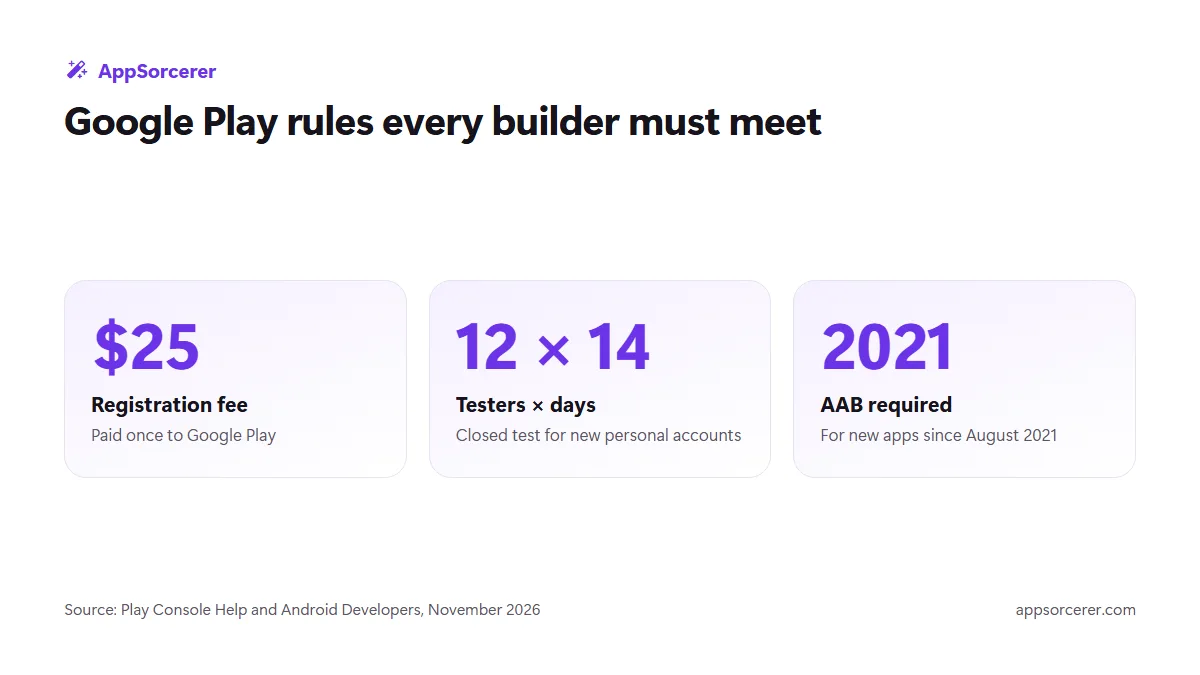
- A signed Android App Bundle. New apps on Google Play must be uploaded as AAB files, a rule in place since August 2021 (Android Developers). An APK alone is fine for testing on your phone, not for a new Play listing.
- Your own developer account and app ID. You pay Google a one-time $25 to register (Play Console Help). Google Play treats an upload with a new application ID as a different app, so choose the ID yourself and keep it for good.
- Time for Google's closed test. If your Play account is a personal one opened after 13 November 2023, Google won't allow production until a closed test has kept 12 or more testers opted in for 14 consecutive days. Our 12-tester guide shows how to get through it.
- Push notifications on the plan you'll actually buy. Ask which plan includes push, and whether it runs through Firebase Cloud Messaging, OneSignal or the builder's own service.
- The native features you need. Camera, biometrics, a QR scanner and in-app purchases usually come as plugins or components. Check before you build, not after.
- What happens when you stop paying. Some builders let you download code; others switch the app off. More on that below.
Which no-code Android builders are worth a look?
Here's the shortlist, with the first plan that lets you publish to Google Play at list price.
| Builder | Type | First plan that publishes to Google Play | Best for |
|---|---|---|---|
| AppMySite | Website to app, plus AI builder | Free with its branding; Starter, $5/mo, removes it | The lowest price for an app from a site |
| Natively | Website to app | Essential, $19/mo ($12 billed yearly) | Bubble, Webflow and other no-code projects |
| FlutterFlow | Visual builder | Basic, $39/mo ($351 billed yearly) | Apps you may hand to developers later |
| Adalo | Visual and AI builder | Builder, $65/mo | Database apps such as bookings and directories |
| Thunkable | Visual builder | Builder, $59/mo ($37 billed yearly), 1 live app | Simple apps and first projects |
| Glide | AI web app builder | Can't publish to Google Play | Internal tools that live in the browser. |
| AppSorcerer | Website to app | Starter, $6/mo (signed AAB) | Android-first sites and Shopify stores |
Sources: each vendor's pricing page, checked in November 2026; links in the sections below.
Website-to-app builders: AppSorcerer, AppMySite and Natively
These are the fastest route if your mobile site already works well, because there's nothing to rebuild. AppMySite is the cheapest way onto Google Play: its free plan can publish one Android app with AppMySite branding, Starter removes the branding for $5 a month, and iPhone apps start on Pro. Natively covers both stores at a low price; its Essential plan includes 4 rebuilds before charging $9 for each extra one.
AppSorcerer wraps a website or Shopify store in a native Android app, configured in App Studio with a live preview in your browser. The Free plan builds test APKs to install on your own phone. Starter, at $6 a month, adds signed AAB builds for Google Play, and Growth at $9 adds push campaigns and automations. Push runs through OneSignal or Firebase Cloud Messaging, and 30+ plugins add things like a QR scanner, biometrics and in-app review prompts. AppSorcerer builds Android apps today; iOS builds are coming soon. If your mobile site is slow, every website-to-app builder inherits that, so fix it first. The website-to-Android walkthrough covers every step, from first build to release.
FlutterFlow: if you might want the code
FlutterFlow is a visual builder for Flutter apps with Firebase and Supabase built in (FlutterFlow pricing). The free plan is for trying it: it doesn't include code download, APK download or store deployment. Basic, at $39 a month, adds all three plus push notifications. Being able to download the project's source code is the best protection against lock-in on this list. The trade-off is effort: you're designing data models and logic, which takes far longer to learn than a website wrapper.
Adalo: database apps with an AI start
Adalo's Ada builds a first version from a description, and you refine it on a visual canvas. Adalo says it compiles real Android App Bundles and submits to Google Play in one click, while you supply the icon, screenshots and store text (Adalo Android builder). The free plan is for prototypes, with one free app build and 500 records per app. Store publishing starts on Builder at $65 a month, which includes 2 published apps (Adalo pricing).
Thunkable: simple apps, but watch the subscription
Thunkable is approachable and includes live testing on your phone. Builder costs $59 a month, or $37 billed yearly, and allows one live published app; Advanced allows unlimited (Thunkable pricing). Read its FAQ before you commit. It says that if your subscription expires, published apps become unavailable to your users, with an exception it names for Pro and Business plans. That's a real risk for an app customers depend on.
Glide and AI web app builders: not for the Play Store
Glide is excellent for internal tools built on spreadsheets, but its help centre is clear that Glide apps are built as progressive web apps and can't be published to Google Play or the App Store (Glide Help Center). That's fine for a team tool. It's the wrong choice if a Play Store listing is the point.
How much does it cost to publish an Android app without code?
Two costs are fixed whatever tool you choose: Google's $25 registration fee, paid once, and your time for the closed test if you're on a new personal account. The rest is the builder. At list price, the first publishing plan ranges from free (AppMySite, with its branding) or $5 a month without branding, up to $65 a month for a visual builder like Adalo. Yearly billing cuts most of these by 20% or more.
Price isn't the whole picture. A cheap wrapper is the better buy when your website already does the job. A visual builder is worth the higher fee when the app needs screens and data your website doesn't have.
How do you choose the right builder?
Start from what you already have:
- A working website or Shopify store: a website-to-app builder. There's nothing to rebuild, so most of the wait is Google's testing and review.
- A new idea with its own data: Adalo for speed, FlutterFlow if developers may take over later.
- A first app, or a classroom project: Thunkable, on a plan that keeps the app live.
- A team tool that never needs a store listing: Glide.
Whichever you pick, build the cheapest test version first and install it on a real Android phone before you pay for anything bigger.
Frequently asked questions
Can I build an Android app for free without coding?
You can build and test for free with most of these tools, but publishing usually needs a paid plan plus Google's $25 fee. AppMySite is the exception, with a free plan that can publish one branded Android app. Adalo's free plan includes one app build, FlutterFlow's has no APK download, and AppSorcerer's Free plan gives you Android test APKs, with signed store builds from Starter.
How is an APK different from an AAB?
An APK installs directly on a phone, which makes it handy for testing. An AAB is the publishing format Google Play requires for new apps, and Google turns it into optimised APKs for each device. A builder that only gives you APKs can't get a new app onto Google Play.
Do apps made with no-code builders get approved on Google Play?
They can, as long as they meet the same policies as any other app. Website-based apps should give people more than the site itself, such as native navigation and push. Our WebView app approval guide covers what helps.
Will my app keep working if I stop paying the builder?
It depends on the tool. Thunkable's FAQ says published apps become unavailable when a subscription expires, while FlutterFlow's paid plans let you download your project's code. Ask every vendor this question in writing before you launch.
Have a website already? Create a free AppSorcerer account, build a test APK from your site and try it on your phone. When you're ready for Google Play, compare plans on the pricing page.