How to Create a Google Play Developer Account (2026)
A step-by-step guide to creating a Google Play developer account in 2026: what to prepare, personal vs organisation, ID and D-U-N-S checks, phone and email codes, and what Android developer verification changes.
On this page
- What do you need before you create a Google Play developer account?
- Should you pick a personal or organisation account?
- How do you sign up, step by step?
- What changed with Android developer verification in 2026?
- What happens after your account is approved?
- Frequently asked questions
- Can I create a Google Play developer account for free?
- Can my agency create the account for me?
- How long does a D-U-N-S number take?
- Will Google Play show my home address?
- Do organisation accounts need 12 testers?
Filling in the forms takes under an hour. Getting verified takes longer, especially for a company that still needs a D-U-N-S number, and it stalls if your documents don't match what you typed. This guide walks through how to create a Google Play developer account in 2026: what to prepare, which account type to pick, every verification step, and what Google's new Android developer verification means for you.
Short answer: Sign in to Play Console with a Google Account, accept the Developer Distribution Agreement, pay the one-time US$25 fee and choose a personal or organisation account. Then link a payments profile, verify your identity with a government ID (organisations add a D-U-N-S number) and confirm your email and phone with one-time codes. New personal accounts must also pass a closed test.
What do you need before you create a Google Play developer account?
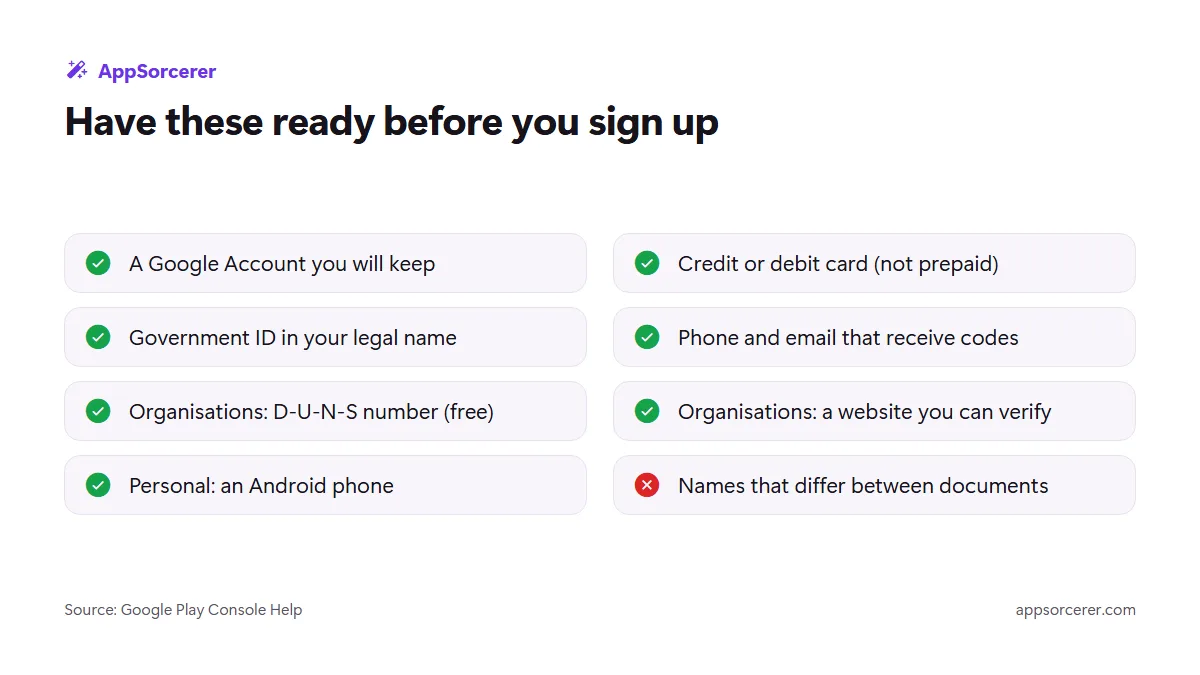
Gather these first. A missing document or a name spelled two different ways is the easiest way to stall verification.
- A Google Account you'll keep. For a business, a dedicated address beats a staff member's personal Gmail, because changing the account owner later means a formal transfer.
- Proof you're an adult. Google requires account holders to be at least 18 (Play Console Help: Get started).
- A credit or debit card in your legal name. Prepaid cards are refused.
- A government ID that matches the legal name on your payments profile.
- A phone number and email that will stay live. Google sends 6-digit codes to both and expects them to keep working for the life of the account.
- For organisations: a D-U-N-S number, an official organisation document, an organisation phone number and a website you can verify.
- For personal accounts: an Android phone, because you'll confirm device access through the Play Console mobile app before you can publish.
Should you pick a personal or organisation account?
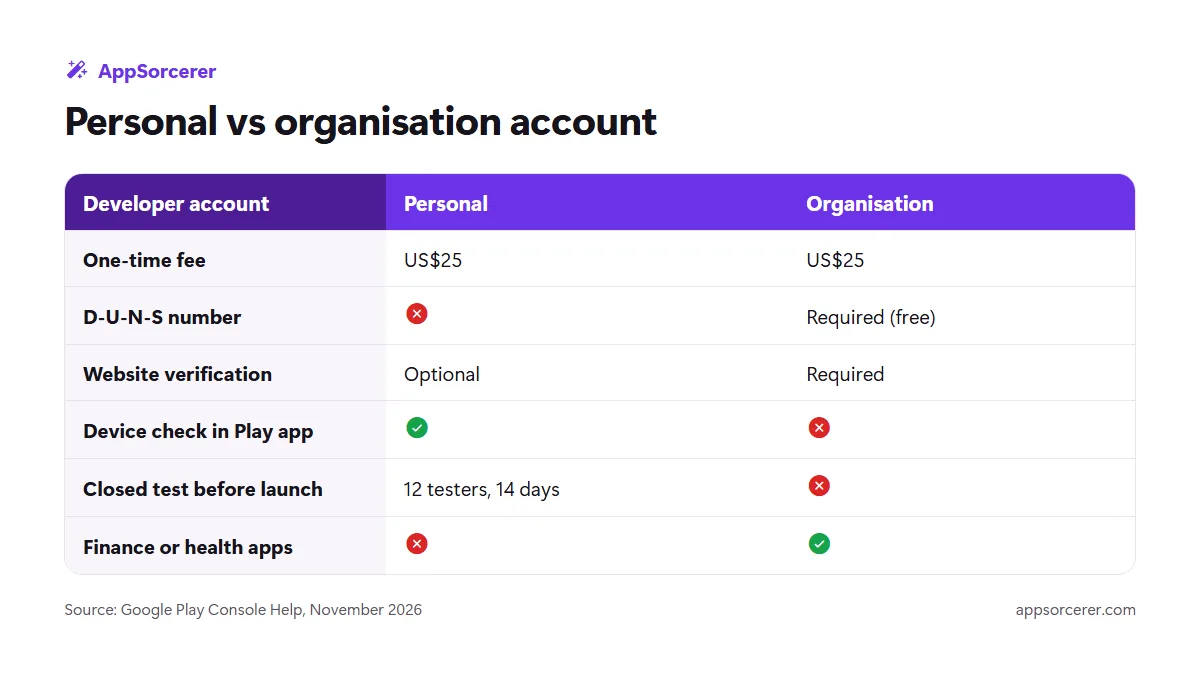
Google's rule of thumb: personal accounts are for individuals, students and hobbyists; organisation accounts are for businesses and institutions (Play Console Help: Choose an account type). Both pay the same fee and have the same core features.
| Personal | Organisation | |
|---|---|---|
| Identity proof | Government ID | D-U-N-S number, government ID and an organisation document |
| Website | Optional | Must be verified |
| Public on Google Play | Legal name, country, developer email (full address if you monetise) | Legal name, D-U-N-S number, address, developer email and phone |
| Before going live | Closed test with 12 testers for 14 days | No closed-test rule |
| Mandatory for | Nothing | Financial, health, VPN and government apps |
Our take: if your shop is a registered company that already has a D-U-N-S number, open an organisation account. It's the more honest fit, it shows customers a real business behind the app, and it skips the two-week closed test. If you'd have to request a D-U-N-S number from scratch, weigh Google's warning that this can take up to 30 days.
How do you sign up, step by step?
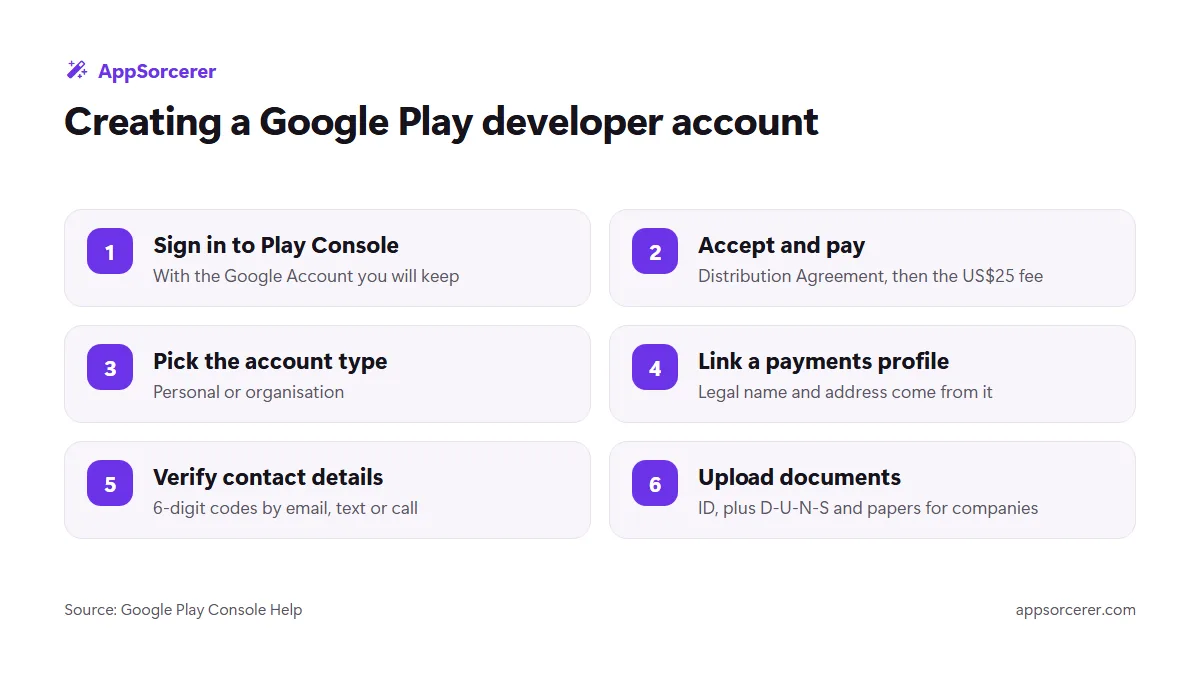
Google's registration guide and its page on required information describe the flow. In practice it runs like this:
- Sign in to Play Console at play.google.com/console with the Google Account you chose, and open the developer account sign-up.
- Accept the Developer Distribution Agreement and pay the registration fee.
- Choose personal or organisation. Take care here: switching later is a separate process.
- Link a Google payments profile. Google copies your legal name and address from it, so make sure both are exactly right. Organisations enter their D-U-N-S number at this stage.
- Complete your developer profile. That means the developer name shown on Google Play (it can differ from your legal name, and you can change it whenever you like), a contact email and phone that only Google sees, and a public developer email. Organisations add a public phone number. Sellers in the EEA and UK also declare their trader status.
- Verify your contact details. Each email and phone number gets a 6-digit code. Phone checks can only start after identity verification, plus device verification for personal accounts or website verification for organisations.
- Upload your documents. A personal account needs a government ID if the payments profile isn't already verified. Organisations upload an ID and an official organisation document too (Play Console Help: Verify your identity).
Google can refuse documents it doesn't support, and it keeps the fee if your information is judged invalid. Scan your ID clearly and use the same spelling everywhere.
What changed with Android developer verification in 2026?
Google now requires apps on certified Android devices to come from verified developers, whether they're installed from Google Play or elsewhere. Enforcement began on 30 September 2026 for users in Brazil, Indonesia, Singapore and Thailand installing from participating stores on devices running Android 7 or later, and Google plans to extend it worldwide in 2027 (Android developer verification).
For a Google Play developer, the impact is small:
- Identity: the verification you complete for Play Console also meets the new requirement, so there's usually nothing extra to do.
- Package names: Google says it registered 99% of existing Play apps automatically. New apps are registered the moment you create them in Play Console, and if another developer already holds that package name, you'll be asked to pick another (Play Console guide).
- Permissions: Play Console has a permission for registering package names, so a developer you invite can handle it for you.
You may also read about free "limited distribution" accounts with no ID check. They're real, but they only cover sharing an app with up to 20 devices outside Google Play. They don't let you publish on the Play Store.
What happens after your account is approved?
If you opened a personal account, your first stop is a closed test: at least 12 testers have to stay opted in for 14 days in a row before Google lets you apply for production. Our 12-tester closed testing guide covers recruiting and the questions Google asks afterwards. Organisation accounts can go straight to a production release.
Next, click Create app in Play Console. You'll enter the app name, a package name, the default language, whether it's an app or a game and whether it's free or paid. The package name is permanent, so choose it carefully. The store listing then allows 30 characters for the app name, 80 for the short description and 4,000 for the full description.
You don't have to wait for verification to start building. AppSorcerer turns your website or Shopify store into an Android app, and the Free plan gives you test builds (APK) to try on your own phone. Store-ready App Bundles for Google Play come with paid plans from $6 a month. Your app is published under the developer account you just created, and our store listings guide helps you fill in the listing.
Frequently asked questions
Can I create a Google Play developer account for free?
No. Every Play Console account costs US$25, paid once. Google's free limited distribution accounts exist, but they're for sharing apps with up to 20 devices outside Google Play, not for publishing on it.
Can my agency create the account for me?
It's better if you don't let them. The account belongs to whoever registers it, along with their identity and payments profile. Create it yourself and invite the agency under Users and permissions instead; invited users don't pay the registration fee.
How long does a D-U-N-S number take?
Google says a new number from Dun & Bradstreet can take up to 30 days, and requesting it costs nothing. Check first whether your company already has one, since many do. Large groups often hold several, so use the one whose details you want on Google Play.
Will Google Play show my home address?
For a personal account, Google shows your legal name, your country and your developer email. If you earn money on Google Play, your full address is shown too, and some countries require extra details. Organisations always show their address and phone number.
Do organisation accounts need 12 testers?
No. Google's closed-test requirement applies to personal accounts created after 13 November 2023. Organisation accounts still benefit from a short test, but they aren't blocked from production without one.
Ready to build while your account is verified? Start free, or compare the plans on our pricing page.